Archive for Web Development

Wedding Website & Invitations

I launched my first new website in a very long time, and also designed some matching print work. This time the client was tougher than usual. But she was also cuter than usual so it was worth it…

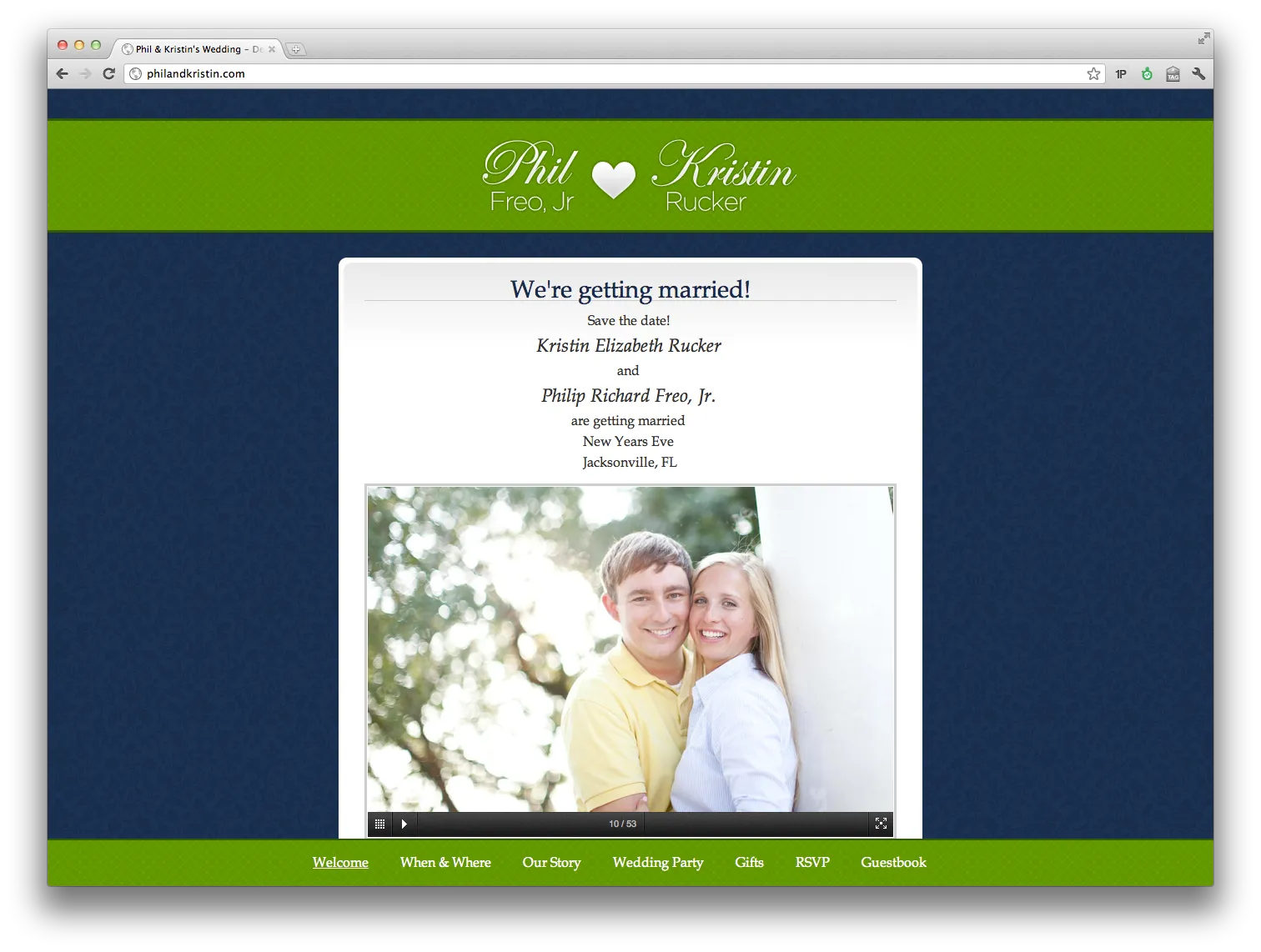
I present to you, philandkristin.com! I built it in Rails 3.1, though it’s mostly all static. It was my first time using Ruby on Rails which I have mostly enjoyed, and hosting on Heroku so far has been quite nice.

And our closest friends and family (man it’s hard to not invite everybody!) will be getting wedding invitations that look something like the left one from my drafts below:

New Job with Startup: Old School Industries

I just accepted a full-time position at a small startup in San Francisco as a lead Developer and Product Manager.  The company is called Old School Industries LLC and is a combination of two businesses: Quizlet and Collectors Weekly.

I’ve been working with the founders, Dave Margulius and Andrew Sutherland (student at MIT), for around 6 months remotely and on short term trips as a contractor, and have now decided to accept an offer with the team full-time.  I’ll be responsible for developing new features on both websites, improving user experience, increasing monetization, and overall growing the businesses.

Quizlet.com is a studying website that lets students make flashcards online and study in a more effective and more fun way.  The site serves over a million students each month, has over 750,000 registered users, and has over 50 million user-generated flash cards.  As only the second developer on Quizlet, I’m excited to grow the website in huge ways and spend most of my time helping make studying better for a lot of people.

Collectors Weekly is a resource for all things collecting, antiques, and vintage.  It’s a combination of great original content and providing tools to browse eBay in a better way (SuperBrowse example).  I just helped launched its new geo-targetted events section and will spend about one third of my time developing new features for this site.

Both websites run on the LAMP stack.  I’ll be working heavily with Apache, PHP, JavaScript / Ajax, MySQL, Memcache, Sphinx, etc. to help grow traffic and features in a scalable way.  A decent number of the interesting technologies that I used for the first time in 2009 were a result of working with these guys.

This is an exciting time and a big opportunity for me as I’ll be able to significantly impact the growth and success of the startup.  It will also nice to be able to focus all my work attention in one direction rather than juggling many projects, as I’ve just graduated from UF and won’t be continuing freelance web work.  And of course, moving to San Francisco from Florida will be a big change and I’m excited, although I’ll still get to fly back every so often.  Wish me luck!

Technologies I’ve worked with in 2009

One benefit of doing freelance development work is that I get the opportunity to get involved in many different technologies and frameworks in a short amount of time.

Since the year is over… here’s a quick list of 15 technologies/frameworks that I got to learn in 2009 alone, during my last year in college.

  1. Learned PHP optimization techniques, such as using APC and Memcached
  2. Worked with the Twitter API to create a Twitter bot
  3. Learned advanced Google Analytics tools and did multivariable testing of conversion rates with Website Optimizer
  4. Work with the PayPal Payments Pro API
  5. Created a simple Facebook App (using FBML)
  6. Learned some Objective C and worked with XCode and Interface Builder
  7. Created a basic iPhone App that interacted with an XML web service
  8. Worked heavily with Magento customization and theming work
  9. Wrote a WordPress plugin to make deploying multiple sites easier, along with plenty of other WordPress development
  10. Wrote an ExpressionEngine module to save people time, and other EE work
  11. Learned about various MySQL performance with different storage engines
  12. Built a Google Wave Robot at a Google hackathon and demoed it at a WordPress Dev Day
  13. Worked with the YouTube API to build an automatic video status checker
  14. Geo-targeting by IP address
  15. Automatic language detection of text with Google’s Translation API

Hopefully 2010 will bring its own interesting technologies and opportunities to learn!

Book Review: “jQuery 1.3 with PHP”

I was given another book to review, called “jQuery 1.3 with PHP”, so here it is.  The book is aimed at beginners or intermediate developers wanting to learn how to “enhance your PHP applications by increasing their responsiveness through jQuery and its plugins“.

Chapter 1: Introduction & Overview, Chapter 2: Quick Tricks – Good chapter to teach beginners to both JavaScript, jQuery, and PHP the differences between client-side and server-side code, and how the jQuery framework fits into it all.

Chapter 3: Tabs and Accordions – At first this chapter looks to be nothing more than glorified examples of jQuery UI Widgets, but later it actually does a nice job showing how PHP can be used with these widgets to do server-side management of the tabs.

Chapter 4: Forms and Form Validation – Interesting and insightful way of validating forms (both on the client and server side, which is necessary) without having to duplicate all the validation rules.

Chapter 5: File Management, Chapter 6: Calendars – Very specific examples, but Ch. 6 uses the very nice jquery-week-calendar plugin to create an interface very similar to Google Calendar and shows how to link it up with PHP managing the events server-side.

Chapter 7: Image Manipulation – Another nice example of bringing using both PHP and jQuery plugins (treeview and jcrop) to create something really useful.  In this case an image browser, resizer, rotator, and cropper.

Chapter 8: Drag and Drop – Standard sorting/dragging examples + persisting data.

Chapter 9: Data Tables – Using the DataTables jQuery plugin with PHP on very large data sets.

Chapter 10: Optimization – A few helpful tips regarding caching, automatically merging .js source files, JavaScript code optimization, perceived user load times, etc.

Overall, if you’re a programmer not super familiar with PHP or JavaScript, this book does have some very helpful explanations with good examples.

One small gripe about the book: while I do know that black and white books are much cheaper to produce, reading code without syntax coloring makes it unnecessarily harder to understand.

To learn more or purchase: “jQuery 1.3 with PHP” by Kae Verens.

Largest website width to support 1024×768 resolution

Currently, web designers are advised to support browser resolutions of widths 1024px and greater based on current browser usage data. The idea is that you want your site’s design to look good, and not require a horizontal scroll bar for those users. But screen resolution and browser width are not the same thing, because of browser chrome, scroll bars, and because many users browse without their window being maximized.

Common advice is that for the 1024 resolutions you have a maximum width of around 960 or 980px to work with. But if you really need to get every last pixel in, I can confirm test results from Windows XP running at 1024×768, with Internet Explorer 6.0 fully maximized, gives you a width of 1007px to work with.

* Of course, fluid layouts are also nice.

ExpressionEngine: “Freo Add-on Installer” makes installing add-ons a breeze

I wrote my first module for ExpressionEngine, called “Freo Add-on Installer”, with the aim of saving EE developers a lot of time.  Here’s what it’s all about.

[Jump to Download/Installation Link]

Each time you set up a website with ExpressionEngine you probably want to install several different modules, extensions, and plugins. Doing that usually involves downloading a .zip file for each add-on, then individually unzipping and uploading each file/folder to the corresponding modules/, extensions/, plugins/, language/, and themes/ folders. Then each time any add-on is updated, you have to repeat the process across all your websites.

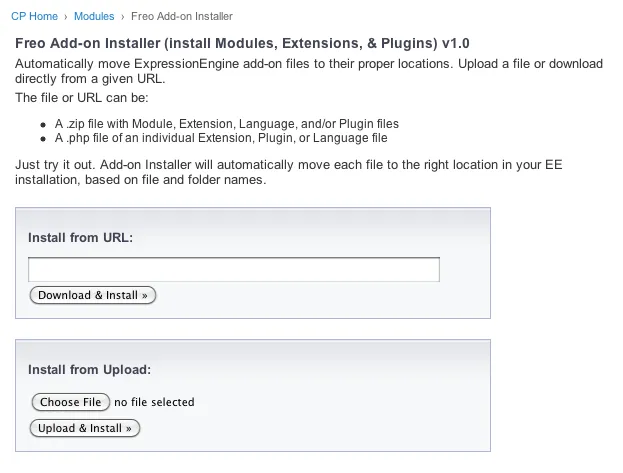
With my module, installing other add-ons is basically a one-click process. You just visit the module page (shown below) and then either upload a .zip/.php file, or give it the URL to the source from the developer’s website. Hit one button and my module takes the source file, extracts, and searches through the files and determines where each file/folder goes.

Screenshot:

Freo Add-on Installer for ExpressionEngine

For example, if you just upload a .zip file that contains a folder for a module, a pi.someplugin.php, and a lang.someplugin.php, all of the files will get extracted and moved to their proper locations. If it comes across a file it doesn’t understand, it will let you know.

Requirements:

  • ExpressionEngine 1.6.8
  • PHP cannot be in Safe Mode
  • You may need to change permissions for a few folders if instructed

These likely would only be a problem with some shared hosting companies. (If you need good ExpressionEngine hosting let me know).

Installation:

  1. Download freo_addon_installer_1.2.zip and unzip
  2. Upload the freo_addon_installer/ folder to your system/modules/ folder
  3. From the Modules page of your EE Control Panel, click “Install” next to “Freo Add-on Installer”
  4. If you’re running a version of EE older than 1.6.8, copy freo_addon_installer/language/english/lang.freo_addon_installer.php to system/languages/english/
  5. Please donate to support development of this and future add-ons.

Changes:

  • v1.2 – Bug fixes (Oct. 25, 2009)
  • v1.1 – Fixed problem when URLs redirect, like on github download zip URLs.  Added better support for installing fieldtypes for Brandon Kelly’s FieldFrame extension.  (Oct. 7, 2009)
  • v1.0 – Initial Release. (Oct. 7, 2009)

Ideas & Plans:

  • Create a long list of known add-ons to choose from so that installing will truly be one-click and not require looking up a source .zip URL.
  • Integrate with LG Addon Updater so installing updates will be more of a breeze.

Feedback & Support:

If you encounter any problems or have any ideas for improvement at all please let me know. Leave a comment below and let me know how you like it. This support thread in the forums is the best place to resolve any problems you may have.

Please donate to support development of this and future add-ons.

Book Review: “Magento: Beginner’s Guide”

I was given a copy of a book called “Magento: Beginner’s Guide” to review, so here goes.  Overall, the book does a good job of giving a high-level walkthrough of all the different aspects of running a store with Magento.

Chapter 1: Introduction, Chapter 2: Installation, Chapter 3: Categories and attributes – High level overview of Magento.  These chapters aren’t very useful if you’ve already used Magento at all, however for someone starting from scratch this would be a faster way of learning than going through the guides on Magento’s website. Chapter 3 is available as a free sample.

Chapter 4: Taxes – Very good chapter – I actually learned a lot.  It was very helpful as I am finishing up a Magento store right now and am about to configure taxes.  It discusses how tax rates and rules work in detail,  according to the product type and purchaser’s location.

Chapter 5: Adding simple products – Same analysis as Chapters 1-3.

Chapter 6: Minimum customization of your store’s appearance – Great for pointing beginners at where different files in Magento live and how to customize them.  However many of the tips for customizing the design will break if you try to update your site and default theme.  I’d recommend reading my post for Magento beginners before you start customizing anything.

Chapter 7: Beyond simple products – Helpful, although doesn’t provide much more information than is readily available on Magento.com.

Chapter 8: Customer relationships – About managing customer accounts. Configuring store contact options.

Chapter 9: Accepting payment, Chapter 10: Configuring shipping – Pretty thorough job of explaining different methods of accepting payments with the various gateways, and configuring all the different shipping options.  There’s a lot of details and explanations, so I’ll be looking back on this chapter again.**

Chapter 11: Fulfilling an Order – A walk-through of fulfilling an order. Discover your options for handling order fulfillment by observing the lifecycle of an order in Magento.

Appendix: Abbreviated step-by-step directions – A good idea for any book!

To learn more or purchase: “Magento: Beginner’s Guide” by William Rice

Fixing Safari’s 1px background-image centering bug

I’m working on slicing and CSS for a new theming project for Magento Commerce and was plagued with a CSS bug that affects WebKit (Safari and Google Chrome).  After some searching I found that several other people have had the problem, but I didn’t see a comprehensive writeup of the solution.  Here’s what I found…

Bug description: When having a centered background image over a centered div (like a drop shadow over a main content div), the background image’s position would sometimes be “off” by 1px as the viewport in Safari, depending on the width of the viewport.  So half of possible viewport widths would show the incorrect version.  While 1px isn’t the end of the world, it can really hurt a design, and it’s nice to get center alignment in Safari/Chrome to work like Firefox/IE.

Example code:

body {
    background: #f8f8f8 url(../images/dh_bg.jpg) 50% 0 repeat-y;
}
div#everything {
    width: 980px;
    margin: 0 auto;
}

Partial Solution: First of all, always use an even-width background image – this way the rest of the browsers will get it right automatically.

To fix Safari we can apply a CSS hack targeted towards WebKit.  If your background image’s width is just a little wider than your main div, then this will fix it:

@media screen and (-webkit-min-device-pixel-ratio:0) {
    body {
        background-position: 49.999% 0;
    }
}

The problem with this is that if the viewport is resized to be a little larger than your div, but not as large as your background image, then the 1px problem comes back.

Real Solution:
So my solution is always use an even-width background image that is wider than the devices you want to support. I made mine 5000px wide (which is still < 1kb).  Then, the following CSS works great:

@media screen and (-webkit-min-device-pixel-ratio:0) {
    body {
        background-position: 50.001% 0;
    }
}

Hope that helps somebody.

Thanks to the helpful comments on Rob Goodlatte’s post (a JavaScript solution), which helped point me in the right direction.

Notes from Google I/O Keynote 2009, day 1

Google I/O Keynote

Wednesday 5/27/2009

San Francisco, CA #io2009

Better liveblogging here: http://www.techcrunch.com/2009/05/27/live-from-google-io-2009/

100x improvement in JavaScript speed in the last decade

Firefox, Chrome, Safari, & Opera – all supporting HTML5 with Canvas, Video, Geolocation, App cache / database, Web workers

Canvas tag – supported in all but IE

Bespin – web IDE

Chrome profiler is built completely in HTML5

O3D – OpenSource 3d in JavaScript

Video tag – get video out of “plugin prison”

YouTube demo with <video> tag

Geolocation – supported in all browsers but IE

Mozillia VP – “A good API in 4 browsers is better than a perfect API in 0 or 1 browsers”

Google Maps will soon be adding a geolocation button

Announcement: Google Latitude on the iPhone in the browser using geolocation (WOW)

App cache / database – supported in all browsers but IE

Demo: with Safari – manifest file names cached application/graphics files

Demo: web app on Android with GMail in airplane mode – extremely fast

Web workers – threads in the browser – so JavaScript doesn’t completely freeze the browser

Demo: motion detection from the video tag all in JavaScript

===

Google App Engine

200,000+ developers, 80,000 + applications

Whitehouse app had 700 requests/second with no problem

Announcement: Java open on App Engine

Demo: develop an Ajax app in Eclipse (with Google plugin) in Java on both serverside (app engine) and client side (GWT) extremely quickly.  Just hit deploy (no FTP) in Eclipse.

Google Web Toolkit

Upcoming: Debug directly in any browser

Upcoming: runAsync() lets the compiler split up JavaScript files.  Example: 1.4MB to 200KB, compiler handled dependencies itself.

===

Google Web Elements (announcement)

Copy and paste website content:

Calendar, Conversation, Custom Search, Maps, News, Presentations, etc.

===

Android – coming soon new features

FREE ANDROID for everyone!
On OSX, svn: This client is too old to work with working copy ‘.’; please get a newer Subversion client

I got this message when trying to use Subversion on OS X through Terminal.

I checked out my svn version using “svn –version” and it said I was using 1.4.4 – so I decided to update. Here’s how…

Download the latest SVN binaries for OS X and install them just like any other program:
http://svnbinaries.open.collab.net/

Update your system wide path settings by editing /etc/profile through the Terminal:

$ cd /etc/
$ sudo vi profile

At the top of the file, add the following line of text, then save and quit vi.

export PATH=/opt/subversion:$PATH

Then rename the old binary:

$ cd /usr/bin
$ sudo mv svn svn.old
$ cd ~
$ svn --version

And you should see the later version (mine is 1.5.5) and all is good.

Thanks to http://www.imarichardson.com/2008/10/06/osx-svn-woes-client-is-too-old-to-work-with-working-copy/