Archive for Web Development

Google Summer Internship Completed / Goodbye California

This summer I had the privilege to intern at Google and spent another summer in Silicon Valley – the hub of all things tech-related. My internship lasted 10 weeks and, much like my Yahoo! internship last summer (I gave my reasons for not going back to Yahoo! this summer), I had an incredible experience.

I learned a lot at Google. I did a combination of development for the front-end (JavaScript/AJAX, CSS/HTML) as well as on the back-end (PHP, Java). Every line of code that I wrote was code reviewed by another Googler before it could be checked in. At first I thought this was an unnecessary and time-wasting procedure, but I came to understand the importance of this, even for the seemingly unimportant pieces of code. When you know someone else is going to be looking at your code, it forces you to program more clearly and concisely, and I learned better coding techniques from the code reviews. Also, by ensuring that all code at Google conforms to the same style guides, any engineer can quickly jump into someone else’s code with the smallest possible learning curve.

My software engineering internship was pretty unique and flexible because of the team that I was on, so I also had the opportunity to do a good bit of UI (user interface) work. I designed from scratch, improved existing UIs, and did research and make recommendations for better UIs. My other team members (here’s two) were very talented and I was able to learn a lot just by working along side them. Working at a company like Google is great because you are constantly surrounded by very intelligent people.

It is a great feeling to know that you’re working at a company which is providing products and services that millions of people use every day. It is an even better feeling to know that your work is directly being used and liked by real people. At Google, while doing research for one of my projects, I had an idea that would help save other Googlers time and make them more productive. Without getting into details about the project itself, after about 1,000 lines of JavaScript, I had created something that a lot of Googlers started using, talking about, and sharing with others. It wasn’t a world changing application that is being launched externally any time soon, but it was useful enough that we could actually see it spreading virally throughout the company, and I got over 100 thank you emails within a few days. I can only imagine the great feeling it would have been to create an external product (like GMail), that millions of people love and use daily.

Another great part of the summer was the opportunities for networking. I was able to visit Meebo for another great lunch2.0, visited the offices of Facebook a couple times, met the creator of Mint (which I think is my favorite web2.0 app of the year), attended WordCamp, and attended the Techcrunch Party 9 at August Capital. It was also great seeing, meeting, and hanging out with a lot of other young people working in the web space – other Google interns, friends at Yahoo! and eBay, those doing startups, others working in the Bay Area, and friends who flew out to visit.

Overall, I’d give the summer a thumbs up. For now, I’m back in Gainesville studying Computer Engineering at UF, where the weather is significantly hotter. A lot of people have asked me about next summer and what I want to do when I graduate. I still do not know. I could definitely see myself at a company like Google, but for now I am just looking forward to a new semester at school and am not making any definite plans yet.

Two Websites Launched

I have two more happy clients now. I’ve launched two new websites recently: SwimmingSafari.com and Hibernicor.com …

Hibernicor, LLC (Gainesville, FL)

This website is for Hibernicor, a medical technology company that is creating a device which allows for better transportation of donor hearts. The website design was based on the client’s needs.

Highlights:

  1. Clean, professional site design to complement the company’s other branding material.
  2. Laid out technical content in a simple way by attaching PDFs and other documents where appropriate.
  3. Developed a simple way for the client to post news updates for those interested in the company.
  4. Built the site around WordPress as a Content Management System (CMS) which allows the client to easily update the website content without knowledge of web design.

“Our clients think the website is great and has a professional layout that is easy to use.”
-Andrew Rivard, Founder of Hibernicor, LLC


Swimming Safari Swim School (Jacksonville, FL)

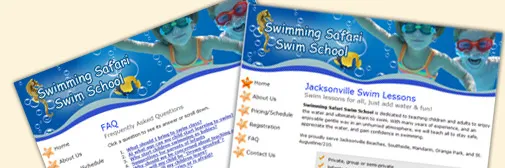
This site is the online home for Swimming Safari, a company that teaches swimming lessons. I came up with a complete website design based on the client’s needs.

Highlights:

  1. Site design is fun and inviting to convey a child-friendly swimming lesson environment, while being professional and easy to use.
  2. Provide a way for the business to accept online payments via PayPal to save time in processing registrations.
  3. Focused heavily on Search Engine Optimization (SEO) in order to help drive local business to the site for people looking for swimming lessons in Jacksonville, FL.

Thoughts and Recap of SXSW

SXSW 2007 Platinum badge

This post comes a bit late, but I wanted to recap my experience at SXSW Interactive 2007. I decided to diverge from the typical college spring break plan and headed out to Austin, TX for the 4-day conference covering topics such as web design, usability, blogging, and other technology.

Some of the panels and parties that I enjoyed the most:

Saturday 3/10:

  • After the Brief: A Field Guide to Design Inspiration. It was great to see some examples of inspiration for designers Jason Santa Maria and Rob Weychert of Happy Cog Studios
  • Grids Are Good and How to Design with Them. Very insightful and practical presentation about using grids in design from Mark Boulton and Khoi Vinh of Subtraction
  • From Tags to Riches: Life After Code.

Sunday 3/11:

  • Keynote Conversation: Limor Fried / Phil Torrone. They’re from MAKE, what else do I need to say? It was also good to see Bre Pettis of Make Magazine again.
  • Avalonstar Bowling Tournament. Thanks Bryan Veloso, this was definitely one of my favorite parts about SXSW. Competition+meeting others in a fun environment was a great experience. My team, Team Pin Monkeys, came in 2nd place overall, after nearly losing to the guys from Clearleft.

Monday 3/12:

  • Barenaked App: The Figures Behind the Top Web Apps. Many thanks to the founders of Freshbooks, Dropsend, and others who were willing to share exact figures in terms of development costs, gross revenue, etc for several popular web apps. I was especially shocked to see the high monthly maintenance costs of these apps – very insightful.
  • The Growth and Evolution of Microformats.
  • Godbit Dinner. Great to finally meet Nathan Smith and several other great people and had some really good conversations.

Tuesday 3/12:

  • Web Typography Sucks. Another great presentation on the current state of web typography. I learned a lot in terms of letter spacing, line height, fonts, special characters, alignment, and more.

All in all, I had a great experience. While I expected to go to SXSW to learn a lot (and I did), I quickly figured out that it wasn’t really just about that. As Richard pointed out, it’s more about meeting people. No other place (arguably besides in Silicon Valley) can you find so many enthusiastic and talented designers and programmers. I was able to just go up and introduce myself to well-known designers and bloggers, and they were always completely approachable and humble. Being in this kind of environment definitely caused me to think about the web design and developing web apps in a different way. SXSWi: highly recommended.

SXSW & Business Cards

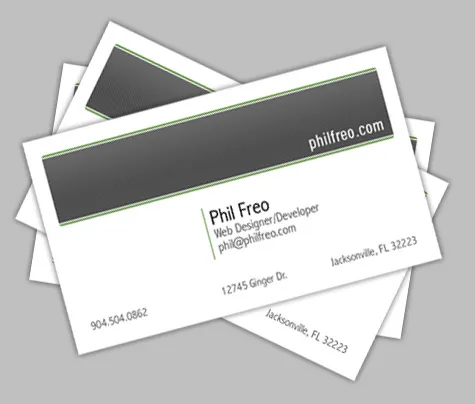
With SXSW coming up, I decided to make up some quick business cards and have them printed through OvernightPrints.com. I can’t believe SXSW (and Spring Break) is only a week away, but I am excited and looking forward to learning a lot and meeting some great people.

It will also be good to see some people I haven’t seen in a while. I’m flying up with Jon Livingston, meeting up with Richard Crowley, and looking forward to see Bryan Veloso at the Avalonstar Bowling tournament. If I know you (or not, but you’re reading this) and you’re going, be sure to let me know so we can meet up. This is guaranteed to be an interesting experience, and I’m excited. Maybe I’m expecting too much, but I’ve heard from people that SXSW can change your entire perspective regarding the web. Bring it on.

CSS Tabs, BrowserCam, and Temporary Email Addresses

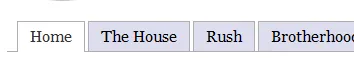
After spending time today with frustrating IE6 CSS issues with borders on ul and li tags, I finished my CSS navigation tabs. The CSS is based on the XHTML produced by the WordPress K2 theme, but can be easily matched for any site.

css for k2 theme tabs in wordpress

Here is the CSS:

ul.menu {
margin: 9px 9px 0 9px;
padding: 5px 0px 6px 10px;
border-bottom: 1px solid #afafaf;
}

ul.menu li {
margin: 0px;
list-style: none;
display: inline;
}

ul.menu li a {
margin: 0;
padding: 5px 12px 6px 12px;
border: 1px solid #afafaf;
background: #DDE;
font: normal 12pt Georgia, 'Times New Roman';
color: black;
text-decoration: none;
}

ul.menu li a:hover {
background: #333;
color: #eee;
text-decoration: none;
}

ul.menu li.current_page_item a,
ul.menu li.current_page_item a:hover {
border-top: 1px solid #afafaf;
border-bottom: 1px solid white;
background: white;
color: #333;
text-decoration: none;
}

BrowserCam is an extremely useful (and quick) tool to easily see a screenshot of your websites in over 30 different OS/browser/version combinations. It’s incredibly handy instead of guessing whether it work in other browsers, or trying to install multiple versions of each browser. It’s free for 1 day for every email address you have…

On an unrelated note, 10 Minute Mail, 2 Prong, and Mailinator allow you to have an instant free temporary email address for those sites that require you confirm an email address but you know you don’t need your real address. Leave your browser window open until you get that “confirmation” email and then forget about it.

PS - If anyone has any advice as to how to easily paste CSS or other code and have WordPress preserve it’s formatting (line breaks and spaces), let me know.

Update on Google Calendar

As a follow-up to my post noting some issues I’ve found with Google Calendar – namely what seemed to be a security hole, I was extremely pleased to see an email from Google on the matter:

Hi Phil,

We came across your blog post about sharing Google Calendar and wanted to follow-up with you: https://philfreo.com/blog/big-security-flaw-in-google-calendar/

We understand that you’re concerned about the security of Google Calendar because you can see all of your friend’s events although he only shared his free/busy information with you.

We suspect that the reason why you can see the details of your friend’s events is because his events are marked as public events. When events are marked as public events, other users can see them even if the calendar itself is set up as a private calendar.

To resolve this issue, can you please ask Bryan to check the privacy settings of his events? To do so, he’ll need to click on events, then select “edit event details” > “Options” > “Privacy.” Under “Privacy”
section, if “Public” is selected, he needs to change the selection to “Default” or “Private.”

Lastly, we understand that many users want the ability to create one main calendar that they can share with their friends without clattering their friends’ calendars. We also understand that our printing features need some improvements. We really appreciate your constructive feedback on Google Calendar and will keep them in mind as we work to improve the quality of Google Calendar.

Regards,
The Google Team

I did have Bryan check and indeed, the settings on each individual event had been set to “Public” rather than to “Default”. While I’m still not sure how that happened (he didn’t do it on purpose), it is much more relieving to know there was a good reason for what otherwise looked like a security hole.

Additionally, it is great to see Google say that they understand the other problems with Google Calendar (such as multiple calendars per person cluttering a friend’s calendar, as well its very ugly print interface). I now have more confidence that it is something they are working to fix.

I have now integrated Google Calendar on another website and am very pleased with how easy it is to give multiple people access to add/edit events. Additionally, subscribing to the calendar’s events make it a wonderful way for people wanting to keep up with the latest events from an organization without having to constantly check back. This was the perfect solution to the previous way it was happening: dozens of email reminders sent a week via the listserv.

However, since Google apparently is listening, I might as well point out a few more things I’d like to see changed in their iframe page:

  • More styling options. For example, there is no way to change the color of the month name from black, and it looks very bad on a grey background.
  • Event wrapping. With often < 700 pixels to work with, you can’t see much in terms of detail when the events don’t wrap. I would much rather lose vertical/height space than how it currently is.

New Website Launched – 24/7 Tutor

I just completed a web design project for 24/7 Tutor – a new Gainesville-based tutoring service for UF students. They let students call them literally 24 hours a day for tutoring in a growing list of difficult classes…

The site’s back-end is run by WordPress – I am very happy with using it as a complete, but cost-effective, content management system (CMS) solution. The back-end is not fool-proof (lot’s of things to click) but certainly is not too difficult for most clients. Most importantly, being able to take advantage of a such a well-written, open-source solution enables clients to have a CMS with little additional cost.

In addition to using WordPress, I integrated a Google Calendar, allowing the company to add events to a good-looking calendar easily through Google’s existing calendar website. Even more exciting is the fact that users of the site can then “subscribe” to the calendar, or copy specific events to their own personal Google Calendar.

Google Calendar is officially my second most-relied-on service by Google (search is #1, personalized home is #3). Even though it does have its share of problems, I now rely on it to pretty much run my life, since I switched from Outlook Calendar a few weeks ago.

Hopefully John, Tom, and Maxim from 24/7 Tutor are happy with the site – and hopefully it will bring them a lot of new business.

Edit: someone asked me if there’s really that big of a market for personal tutoring for a University. There certainly is. TutoringZone currently dominates the market I believe (although with a crappy web design), TutorGator looks like they just ripped off Facebook’s site design, and I know there is at least one other company.

developers.facebook.com

Facebook just launched developers.facebook.com, allowing developers to interact with Facebook through an API. This is a great step for Facebook. It will increase functionality as developers create new applications and makes the system more “open”. At the time of writing, there are already 2 applications in the “product directory”. One creates a photo mosaic of your facebook picture with your friend’s faces. The other is an expense tracking program. Neither are too exciting as of now, but the possibilities have just been opened. Check it out:

developers.facebook.com
One key thing to note: the API does not allow the retrieval of member’s ever-so-crucial contact information (neither cell number nor email address).

My guess is Facebook is trying to protect its most valuable asset: a huge directory of contact information, while at the same time protecting its members from getting spammed as a result of the API. The API has a decent balance of allowing developers to do what they want, while still pointing a lot of traffic back to Facebook.com. For example, you call pull a lot of information about friends, photos, walls, and so on, but anytime you want to let a user actually do something on facebook (write a message, poke, make friends, etc), they have to be directed back to the site. This makes sense in regards to security and Facebook’s business model. Nobody can really screw up their own facebook account through a malicious API, nor can anyone easily create a Facebook competitor.

I’m looking for good ideas for an application using Facebook’s API. I have a couple ideas already in dealing with photos, which I may try and implement if someone doesn’t beat me to it. I’m just wondering how long until someone makes a Facebook “Hot or Not” website.

Edits:
Interesting: I just got my Facebook API key / “developer account” and was given an “app_id” of 151. So two products have been submitted to the directory, while 149 other people have received API keys already. It will be interesting to see how many of these turn into production applications, my guess is less than 5%.

I also like seeing the Facebook Developers Discussion Board. It’s getting to be active quickly and is a good place to keep an eye for applications in development.

I also believe Flock could benefit greatly from this by increasing its photo support from Flickr and Photobucket to include Facebook Photos, as well as notifications to wall changes, friend changes, etc. Note to self: email a flock community ambassador.

Yahoo! User Interface (YUI) JS Libraries updates released

Some exciting news for front-end developers today: The Yahoo! Developer Network has released the newest version of it’s YUI JavaScript libraries today. With extensive documentation, great support for cross-browser coding, and a couple new components, these tools are becoming an even better solution for JavaScript developers. Check out more at the official YUI blog. Here is what’s new:

Updates to the previously beta versions of:

  1. An event utility
  2. DOM collection manager
  3. Connection manager (for AJAX / XHR calls to the server, now with file upload)
  4. Drag & Drop utility
  5. Animation Library (now includes color animation support!)

Additionally, the release of improves upon:

  1. AutoComplete
  2. Calendar
  3. Container (including Module, Overlay, Panel, Tooltip, Dialog, SimpleDialog)
  4. Menu
  5. Slider
  6. TreeView

And adds a new control: the Logger (beta).

What’s so great about these YUI Libraries? What about Prototype, Dojo, and Mochikit? As a former Prototype enthusiast before coming to Yahoo!, I noticed a couple things beneath the surface that I began to really appreciate when I made the switch:

  • I like knowing that a company of 12,000 people is backing, using, and continually supporting/improving my JavaScript library. They have a full time staff of people that are incredibly at handling all the annoying cross browser concerns and repetitive JavaScript tasks, so I don’t have to.
  • I have grown to love the heavily name-spaced nature of the YUI libraries. Sure, at first glance it may seem annoying to have to type YAHOO.util.Event.addListener, but it makes code highly independent and guarantees that it won’t interfere with other functions of the same name. One trick: add YUE = YAHOO.util.Event at the top of your page and you’re golden. I’ll admit, I do miss the $ function, but that can always been added individually.
  • The ability to extend the YUI classes is great. Say you need an extremely customized version of the Drag & Drop library. Easy, just take what they give you, and overwrite through inheritance in your own file the individual functions you need to modify.
  • Unlike Prototype (and others), there is not one massive JavaScript file.  Instead, if you only want Event Handling, you only include a small global yahoo.js, as well as event.js.  Then if you later want to add animation, you just include animation.js.  The point is, you only add what you need.

My absolutely favorite part of developing with the YUI libraries is getting to use these cheat sheets. Go print them now!

Fun times in Cali – including BarCamp

I’ll post about working for Yahoo! more later, but I just want to write about some fun times in northern California over the last couple weeks. From disc golf in Santa Cruz (photos) with Dimitry Bentsionov and Scott Schiller, to taking a road trip to Santa Barbara with some local Kappa Sigma guys, or just hanging out in San Jose (photos), my time here has been great so far.

Today was good. I met up with Dimitry, Bryan Veloso, and Paul Stamatiou (another Yahoo! intern) and went to a car show in San Francisco to show of Bryan’s sweet ride. After, the three Y! interns headed over to BarCamp San Francisco upstairs in a Microsoft building downtown. It was a good time meeting and hearing from some people in the industry. Later, Will Pate rode Caltrain back with us and gave us a tour (photos) of the Flock offices (thanks Will!).