Archive for Startups

End of 2012 Review

At the end of a year I like looking back and seeing what I’ve accomplished and what new technologies I started working with in the year. Here’s a little summary.

Company

I started 2012 in a new role at ElasticSales to lead the product/engineering team, working on software to make better software for sales people. It’s been a great year and I’ve gotten to learn a lot of stuff and work with a great team.

ElasticSales.com – Designed a company website to show credibility for our sales as a service business, help with hiring, etc.

Close.io – Launched the sales application we’ve been working on for months (and I launched this website for it). Designed completely different from traditional CRMs like Salesforce, Pipedrive, etc. it’s focused on helping with sales communication rather than just being a database. It does this by automatically logging all calls and emails (incoming and outgoing) in one place to remove the typical data entry associated with CRMs. Also making it much more beautiful and fast than those legacy sales apps.

A big goal for 2013 is to make Close.io a huge success as a profitable SaaS service that people love.

Design

I added 12 shots on Dribbble in 2012. Though most of my “design” work was simply trying to make good user experience in Close.io.

Front-end Development

Backbone.js – I had significant experience working on big JavaScript projects before 2012 (using vanilla JS, jQuery, MooTools, etc.), but hadn’t used a higher level framework like Backbone.js. In the past 12 months I’ve been primarily doing front-end development and built two large apps using Backbone. I’ve also been able to contribute a few patches, features, and unit tests to the project. I love the framework because it seems to provide just enough structure to be useful everywhere without too much bloat. It’d be hard to imagine making another client-heavy web app without using something like Backbone.

Along with writing a bunch of code specific to Close.io, I’ve become deeply familiar with several Backbone add-ons:

  • Backbone-Forms – Auto-generate HTML forms that sync with Backbone models. I’ve been able to contribute significantly and help triage pull requests and issues for this project.
  • Backbone-Relational – Adds relations between Models & Collections. I contributed significantly to this project as well.
  • Backbone.Declarative – Adds a declarative syntax (similar to how Backbone DOM events work) for binding Model/Collection events to Backbone Views. I helped rewrite this project to work better with Backbone 0.9.9.
  • Backbone-Super – Nice syntax for calling “super” for friendly OOP-like functionality
  • Backbone.Stickit – 2 way DOM <-> Model binding
  • Backbone.InfiniScroll – Infinity scrolling in Backbone Views
  • Backbone.Mousetrap – I wrote this as a better integration of Mousetrap (JS keyboard library) in Backbone Views.
  • Backbone.Mutators – Provide getter/setter support on Backbone Models. Started with this project though ended up writing my own implementation that I thought was better.

Grunt – Useful command line / JavaScript-based tool for creating tasks for minifying, concatenating, compiling JS/CoffeeScript, etc. Used heavily in our deploy process.

RequireJS – I’m using RequireJS heavily to keep our application nicely organized into modules, with dependencies declared explicitly.

LESS – extends CSS with a better syntax, mixins, variables, etc.

QUnit – I got much more serious about front-end / JavaScript unit testing this year, as well as better at testing in general.

Bootstrap – used as a base set of styles and core mixins. Great when using LESS

Several other front-end JavaScript projects, jQuery plugins, etc. Most of my open source work is done via Elastic’s GitHub.

Back-end Development

Python – In 2012 I went from only know a touch of Python to feeling comfortable writing significant amounts of code in it. I added plenty of features and fixed plenty of bugs. I’d definitely use Python instead of PHP now for new projects and am a big fan of its simplicity and syntax.

Django – I spent several months working on a Django project. I got deep into Django and used various add-ons for it. For any significant traditional web app written in Python, I’d still recommend using Django.

Flask – I’ve written 4 or 5 projects using Flask now and love it for its simplicity. We’re using Flask for Close.io and are using several extensions (that we wrote and 3rd party). My team wrote Flask-Mongorest which especially has made writing a MongoDB-backed JSON REST API super convenient.

MongoDB – I’ve learned a good bit about using MongoDB, and some of its best practices, as well as its gotchas.

AWS – I’ve used several AWS services before 2012, but this past year led to much more significant experience using EC2, S3, RDS, Route 53, ELBs, etc. I’ve deployed several different services using both raw AWS as well as Heroku now, and love the flexibility and ease for creating scalable systems.

Blogging

I redesigned my personal website/blog this year for the first time in 6 years! I also had 13 blogs posts this year, which is pretty good for me, as well as a guest post on TechCrunch. Here are my 2012 blog posts:

I’d like to do shoot for at least 13 posts in 2013 as well.

Personal

It was a big year for me. I started a new job at Elastic, started a life with Kristin after getting married on New Years Eve, moved to a new apartment in a new town, and started attending a new church! Let’s hope 2013 is as exciting!

How to allow direct file uploads from JavaScript to Amazon S3 signed by Python

On Close.io we originally implemented Filepicker.io to allow for file uploads while sending emails. While it was a quick way to get started with file uploading initially, after several minutes of downtime of their API and then an unannounced change in their JSON response format, I was reminded once again that you shouldn’t to rely on small startups for critical parts of your tech infrastructure.

There’s nothing wrong with filepicker.io if you want to use a lot of their features, but in our case we just needed to allow simple uploading of files to our own AWS S3 bucket. Here’s how:

Setup S3 Bucket with CORS Policy

Create an S3 bucket from the AWS Console (if you haven’t already). In its properties, click to Edit CORS Configuration:

This will allow cross-domain posting from the client.

Setup an IAM user
You can use your main AWS credentials, but I recommend generating keys with only the permissions that are necessary. In AWS, setup an IAM user with the following permissions policy.

Add the JavaScript
First grab the code and then implement it on your site:

Server endpoint for signing requests
To protect your AWS user credentials, we keep them on the server and then “sign” each upload right before sending it to S3. Here’s the endpoint in Python / Flask:

Here’s the gist with all the embedded code.

Thanks to CodeArtists for the original tutorial. I improved their code some and converted it to Python.

Guest post on TechCrunch: Full-Stack Web Team

I had my first guest post on TechCrunch last week! Here’s an excerpt:

There is often confusion about the various roles of a web engineering team. I have had to explain, even to technical recruiters, the differences between these roles and that the lines that separate them are often fuzzy. I thought I’d share the framework I like to use to evaluate whether someone is a good fit for a startup’s technical team.

In a startup, you can’t afford to have people who are only able to do one thing. Someone could be adept at writing HTML/CSS, but if they don’t have a great eye for design or know JavaScript well, it’s just not worth having them on the core team. Similarly, somebody who knows a little bit of everything but isn’t advanced in anything will just drag the team down.

The size of the company or startup will determine how many different hats each engineer must wear. Many startups get off the ground with a single founder who does a little bit of everything until he or she can grow the team. It’s also possible to outsource some roles completely. Just as cloud-hosting providers such as Amazon Web Services have drastically reduced the need for hardware/network engineers in web startups, platforms like Heroku take it further and (for a price) can reduce sysadmin and DevOps work almost entirely in the beginning.

In pretty much every case, when a startup grows, people will inevitably start specializing. Even those rare gems, who in the early days can spend the first half of the day in Photoshop and the second half scaling a database, will eventually specialize at least somewhat. If you’re hiring well, you’ll always find someone who can outperform you in at least one area.

I’m a big fan of “full stack” people and think specializing too much, too early, is a bad sign for startups. At Elastic, each of our engineers has written CSS and done database/server management. It’s good when a problem arises for there to be more than one person capable of fixing it. That said, I’m spending the bulk of my day writing in JavaScript/Backbone.js because I enjoy it much more than a coworker who’d rather be in Python as much as possible. That’s healthy and it works.

You can read the rest over there.

Launched Close.io – sales communication software

I just launched a website for Close.io, the product we’ve been working on at Elastic for the past few months.

Go check it out: http://close.io/

We’ve built this as “sales communication software”, which we believe didn’t really exist before. CRMs (salesforce.com, I’m looking at you!) are inadequate because they are more like databases of contacts than software that really helps you do the selling. We’ve trying to change that by making your sales phone calling and sales emailing experience tightly coupled with your lead data (CRM).

Would love to hear any feedback you have about the product!

Quick notes from Startup School 2012

I got to go to Y Combinator’s Startup School this year and had a great time. Between the reception dinner the night before and the day of event I got to meet a lot of great people and reconnect with some I’d met in the past or only talked to online. Most of the speakers were really good.

I took some very brief notes during some of the talks of the 1 or 2 things that stuck out to me as either surprising, motivational, or instructional.

Zuckerberg: He never thought they’d be the people to build what they knew would eventually exist. They expected someone huge to build it, but it turned out none of them cared as much.

Uber: Doesn’t own any cars or employee any drivers, or spend any marketing money. Avg customer spending $105/mo. 50% of all riders have ridden in the last 30 days.

Jessica Livingson: The keys are determination (resilience + drive), rejection, build something people want

Patrick / Stripe: Trying to be the economic infrastructure of the Internet. Build something that enables others and you’ll succeed. Both are addictive: the day to day debates and the high level strategy stuff.

Horowitz: Create something people don’t even know they want that eventually they will need.

Companies follow extreme power law curve
– Needs to generate $100M in annual revenue
– breakthrough idea
– founder with the courage and skill to build the great idea into a great company
– leadership vs management – can you articulate a vision, get people to work for you, and the confidence to make it all believable

Pinterest: 3000 users within first couple months after launch (but most weren’t very active). However, it was XX months to get there before launching.

Joel Spolsky: Do not straddle the line between get huge fast and bootstrapping. But both are good strategies.

Weebly: Worked on it for 20 months before seeing first real traction! Working business model took 3 years.

Objective Process for Product Reviews

I watched Jeff Veen’s “Designing for Disaster” talk (below) and took away a couple of parts that I thought were really good. Some notes:

How to do Product Reviews (can be design, product, process, anything) — making an objective process out of something that is very subjective.

  • Optional attendance, but mandatory participation (keeps everyone focused)
  • Not a forum for expressing opinions
  • Rather, a place to solve problems.
  • Define in the beginning if session is supposed to be divergent or convergent.
    • Divergent –  I want as many ideas to solve this problem as possible – let’s talk about everything; brainstorming
    • Convergent – Evaluating feasibility, acknowledge constrains. Drive towards consensus.

Driven by Purpose

  • Measure momentum in days (weekly checkup of progress)
  • Measure projects in weeks (figure out pace, when we will go out with the next thing)
  • Measure priorities in months (“we’re going to focus on performance and distribution in Q2”)
  • Measure vision in years (“organize the world’s information and make it universally accessible”)

Why is this so hard… Apple

It’s 2012 and the web and mobile devices are capable of amazing things, which is why it’s so surprising to me that some of the simplest things are still so hard.

I’ve got the latest iPhone with its 8MP camera and HD video camera, complete with iOS 5 and I pay for extra storage on iCloud. Apple’s supposed to be the best at designing simple user experiences across hardware and software – and I believe they are.

So when I want to take a bunch of photos and videos that I took from my iPhone and share those with some family members, it should be simple right?

Yet it’s not. Sure, there are some solutions:

  • The “Share” button in iOS that only lets you send one video at a time.
  • Facebook app so you can worry about privacy and exclude your family who’s not on Facebook. And still not easy to upload a bunch of photos/videos.
  • Dropbox app is alright for uploading but then you’re worrying about how much space you’re using (those were HD videos, after all, and you don’t want to reduce quality), you have to wait for uploading, you can’t browse your photos/videos by thumbnails – only filename, and worst of all there’s no easy way to share several photos/videos at once to somebody.
  • Kicksend – getting closer, but can’t send both photos and videos together, can’t compress or send while the app’s not open, and the recipient has to download the files to their computer and open them one at a time. Seems simple enough but that is tough for some people – why can’t there just be a simple way to look at them online?

Even dragging out the USB cord to plug my phone into my MacBook Pro doesn’t yield a simple solution. Open iTunes, iPhoto, etc. – haven’t found the answer. Dropbox comes the closest with its new “Camera Uploads” feature (which has been out less than 1 year) but still doesn’t cut it when it comes to sharing specific photos/videos after uploading.

Here’s what I would hope for from Apple in 2012:

  • Buy latest iPhone.
  • Take photos and videos on iPhone.
  • Tap a couple buttons to select photos and videos to share.
  • Choose who to share them with, press Send.
  • My family gets sent an email link to a webpage with thumbnails of the photos and videos sent, with a one-click way to view each of them. Could even be a native app experience if the recipient is a Mac or iOS user.

What’s important are the things that shouldn’t have to be a part of the process:

  • No large email attachments or file downloading required for the recipients – a web browser can be a great way to browse media and is certainly the simplest, and Apple has already been killing the file metaphor on mobile.
  • No long on-screen waiting for uploading or compressing – Apple is already uploading my stuff in the background for Photo Stream so this should be simple.
  • No special apps to download – Apple has always been a “we take care of all of the basics ourselves” type of company.
  • No worrying about storage space in the cloud – this is 2012 and disk space is super cheap, and I’m already making Apple gobs of money on the hardware. Fine, I’ll pay extra for iCloud even but it shouldn’t be something I could fill up easily like Dropbox. It should feel unlimited.

As a developer and product designer, I recognize that pulling this off is no trivial task. You’d have to design a whole web app for viewing this media, build a super scalable backend to handle it, make iOS changes, etc. Hardest of all you’d have to make sure this fits into a larger product vision.

But surely Apple with its nearly unlimited resources and great talent should be able to. Sadly, as plenty of people have pointed out, they still don’t get the web like they get hardware and software.

That leaves a big hole for other players to fill. Dropbox, Google, Facebook – you’ve been given a big wide open opportunity to shine, but so far have not impressed. So listen up entrepreneurs, Apple executives, and young dreamers: the field is wide open for better products – have at it!

Two Years at Quizlet

The last two years (2010-2011) I spent working at Quizlet were an incredible learning experience.

Like I did in Jan 2010, I wanted to reflect on some of the technologies I learned and things I did over the last 2 years…

Backend:

  • Learned tons about scalability! Scaled Quizlet to serve 11 million visits per months (60 million pageviews, 5 million uniques), serving mostly UGC content with an average page response time of < 50ms.
  • Got very comfortable with understanding and tweaking advanced configuration options of Apache, PHP, & MySQL for desired functionality and scalability requirements
  • Went from a command line beginner to feeling very comfortable in Linux and Solaris, frequently writing bash/shell scripts for common sysadmin tasks, and trying to automate as much as possible.
  • Worked with large data sets: our database had several hundred million rows and was in the dozens of gigabytes in size.
  • Played a dev-ops role and helped transition all production servers to use Puppet for configuration management. Focused on having a process for all server related changes and created the ability to have over a dozen different servers recreate-able in very little time.
  • Learned how to make MySQL fast on a high-trafficked and large database, do replication and have a quick recovery plan. Dealt with configuring databases, designing schemas, and optimizing SQL statements. Also managed our relationship with Percona’s consultants (leading MySQL experts) and learned from them.
  • Automated backups and ensured we had quick access to them in the right places plus securely storing them off-site to Amazon S3 for safety. We had people relying on their data being accessible for studying and thankfully were able to recover quickly from incidents without losing any data.
  • Sphinx Search is a very powerful open source search server good for indexing and quickly searching over MySQL. I learned how to configure it for our purposes and use its various features to power search on millions of rows of Quizlet content in a couple hundred milliseconds.
  • Implemented and used several performance monitoring tools to keep tabs on a heavily trafficked website: Nagios, Munin, New Relic, etc.
  • Learned all about (and implemented) email deliverability best practices: SPF records, DKIM, rDNS, Feedback Loops, IP address reputation, etc.
  • Used several cloud service providers (Joyent, Slicehost, Amazon AWS). Setup reverse proxy CDNs for optimal performance of static files.

Frontend:

  • Major focus on serious performance optimizations across entire stack. Spent time obsessing over how to get an extra 20ms out of a page load from our backend while keeping code clean. Resulted in an average page load of < 50ms across Quizlet.
  • Also became extremely good at front-end performance; Did JavaScript profiling, proper handling of static files, caching headers, etc. Attended Velocity Conferences; Kept tabs on PageSpeed and WebpageTest waterfall results.
  • Used Google Analytics Event Tracking for tracking client-side user events via JavaScript. Good for error detection and user behavior analysis.
  • I already knew PHP well, but I’d say now I’m more of an expert at properly structuring object-oriented PHP5 on a large codebase.
  • Learned all about and then implemented website localization & internationalization (i18n) for Quizlet, helping create a framework for user-generated translation submissions that launched in 7 languages.
  • Got deep into Unicode and character encodings and implemented a language detection system in PHP based on n-grams and character encodings.
  • Spent time optimizing with AdSense – A/B tested with different ad placement, targeting, and IAB ad sizes for better inventory.
  • Wrote a very fast A/B testing framework and used it to optimize our upgrade page for better monetization
  • Went very deep on the MooTools JavaScript library using it to build complex study games. In the past, jQuery has been my JS library of choice, but MooTools is very nice at being object-oriented and not afraid to extend native objects.
  • Used Google Maps & Geocoding  API heavily (JavaScript and PHP) to build an events directory on CollectorsWeekly.
  • Used the Stripe API to accept credit card payments (replacing our previous PayPal solution).
  • Lots of cross-browser CSS – making things look good in browsers both old and new.

Dev Processes:

  • Helped lead the development team with best practices and good processes for coding and communication.
  • Became really good at Git and transitioned our team from SVN/Trac to Git/GitHub. Used git submodules to manage many of our dependancies and became a better open source citizen by submitting pull requests and bug reports in more projects.
  • Did a lot of code reviewing on trac and GitHub with peers and new hires / interns.
  • Introduced unit testing in both PHP (via PHPUnit) and JavaScript (via Jasmine); did some test-driven-development (TDD).
  • Created a safer deployment process which first runs unit tests, PHP Lint, and other sanity checks before deploying.
  • Started daily standups with the eng team to keep everyone up-to-date and on track.

Product:

  • Along with development work, I was doing a lot of Product Management: feature triage and prioritization, tracking roadmaps, deciding among tradeoffs, etc.
  • Huge focus on the user interface: tried to make every new feature high quality and easy to use. Spent a lot of time redoing the user flow of features that already existed to improve their ease of use. Removed clutter and made features that “just work”.
  • Used Photoshop to work on visual improvements — designing or redesigning almost all the main pages and many shared UI components on Quizlet.
  • Brainstormed and implemented game mechanics and other ways to make studying on Quizlet more fun and social.

Business+Management

  • Focused heavily on recruiting other developers, helped create a process for finding potential candidates and putting them through a funnel. Did a lot of technical interviewing by phone/Skype and in-person. Helped build a great team of full-time people and interns.
  • Team building. Helped manage and guide new employees, getting them up to speed and supporting their projects.
  • Did a fair amount of biz dev as well. Negotiated deals for licensing software, worked out details of contracts. Talked with potential partners.
  • Managed projects that other developers were working on, pushing for both code quality, fast completion, and a high quality user experience.
  • Wrote a bunch of Quizlet blog posts about product announcements.

I’m sure I’m missing lots of stuff, and I should probably take even more time to write down some higher level lessons learned about startups. But for now this will do: startups are awesome and the best way to learn a lot of stuff really quickly by doing it. And if you’re lucky like I’ve been, it will be with an awesome team working on a great product used by tons of people.

I’ve recently moved onto a new opportunity that I’m very excited about. But I’m really glad to have been at Quizlet the last two years and I look forward to seeing it continuing to succeed widely!

(P.S., they’re hiring…)

Honestly.com – Not acting so honestly

I hate to have my first blog post after over a year be a negative one, but I feel like these guys need calling out.

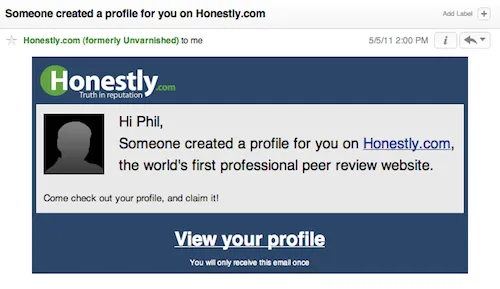
I recently received an email from a company, Honestly.com, that got me quite curious. I looked up the website to see what it was all about, and I saw that they are a way of reviewing former/current coworkers and business partners. Their tag lines are “Get the inside scoop on your potential boss, coworkers, or business partners.” and “Candid community-created reviews of business professionals.” I sort of expected them to be a more extensive version of CubeDuel (which was quite fun for the first few minutes), but with full reviews rather than just ratings…

Seeing this email (“Someone created a profile for you…”) after seeing what their company does instantly made me think that someone left a public review about me. Naturally, I was quite interested in seeing what it said, so I clicked through.

Bringing me to the site…

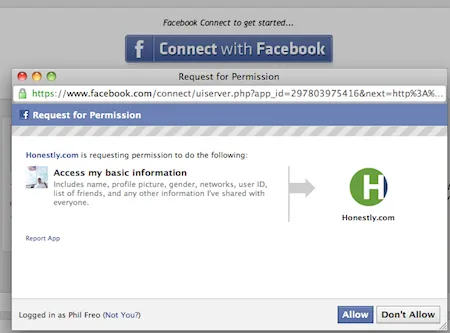
Step 1: Their only option is to Login with Facebook and give them your Facebook info and a list of all your friends. Kind of annoying, but I login with Facebook lots of places online, so whatever.

Step 2: Get your email address

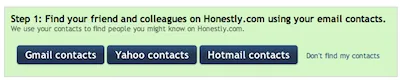
Step 3: Try to get your email contacts

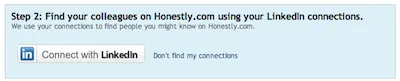
Step 4: Try to get your LinkedIn contacts (your Facebook friends weren’t enough apparently)

Step 5: At this point I think to myself that I’m done with all the “let’s try to make this web app viral by gathering as much info as possible” crap. Nope… the next screen is the best one yet.

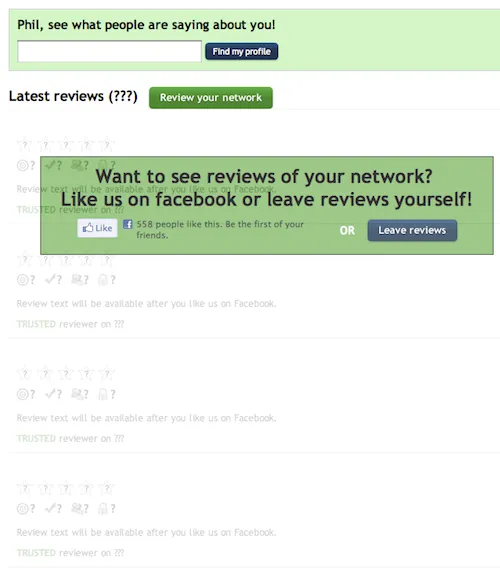
As you can see, I’m so close to being able to see all these reviews about myself. See look – they’re right there on the screen already, just dimmed out and they say “Review text will be available after you like us on Facebook.”  It looks like there are already several reviews/rankings for me and as soon as I click “Like” I’ll be able to see them.

I don’t want to “Like” Honestly on Facebook. I don’t like them so far (they haven’t done a single positive thing for me at this point) and I certainly don’t want to broadcast to my friends that I like them. But as I’d also not like to connect my LinkedIn and leave reviews, I “Like” them knowing that I can fix this on Facebook immediately after.

So finally, the big moment of getting to see my reviews!!…

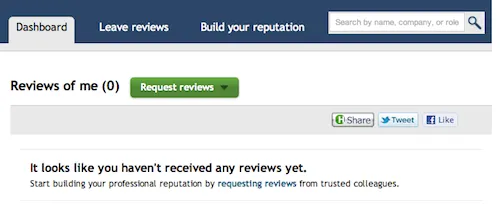
WHAT?!?! All that for nothing! So they sent me an email saying “Someone created a profile for you on Honestly.com” and there’s nothing there — what a bait and switch. Sure, you can debate the semantics of someone “creating a (blank) profile” vs. someone “leaving a review”, but they are clearly taking advantage of both me and whichever of my Facebook or LinkedIn’s friends that “created a profile” for me (a.k.a., probably just imported their contacts with no intention of all of them getting a deceptive email).

Bottom line: I think the idea is good and I have plenty of respect for investor Joshua Schachter of del.icio.us… but with a name like “Honestly” and a tagline of “Truth in reputation”, they should drop the sleazy and spammy tactics. If you’ve got a startup then by all means: use Facebook, Twitter, and LinkedIn to grow. But please, do it in a respectful and honest way.