Yahoo! Time Capsule / Cali Fun / OpenDNS

I just got back from another trip to the Bay Area in California, where Yahoo! generously flew me out to be a part of their Time Capsule Camp event…

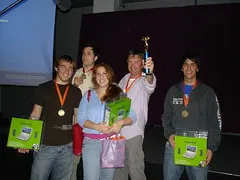
The event was a lot of fun – we “made media” for the Time Capsule. We had a big mobile scavenger hunt by The Go Game and ended up with some funny video (it’s long) and pictures (full photoset). Go team super6 (we won)! We then had some great food and a workshop on Flickr and Jumpcut. It is clear that Yahoo! is about social media.

Next up was some unscheduled fun with Bre from Make who set up his balloon aerial photography unit (here’s a great photo). It was crazy letting loose a digital camera attached only to a big bunch of balloons and a line of 1000 feet of string.

Monday night was a dinner, thanks to Paul, with David Ulevitch and Allison Rhodes from OpenDNS. We had a great dinner and conversation as well. If you haven’t already, go set up OpenDNS now (it will only take 1 minute) for a better, safer, and faster internet. OpenDNS protects users from phishing scams, and if I type example.cmo, I will automatically be redirected to my intended domain.

Overall it was a great trip. It is always good to catch up with friends from Yahoo! and hang out with fellow previous interns like Paul, Richard, Doreen, and Britta. (And can’t forget some good In and Out burger with Jason Katzer)

Update on Google Calendar

As a follow-up to my post noting some issues I’ve found with Google Calendar – namely what seemed to be a security hole, I was extremely pleased to see an email from Google on the matter:

Hi Phil,

We came across your blog post about sharing Google Calendar and wanted to follow-up with you: https://philfreo.com/blog/big-security-flaw-in-google-calendar/

We understand that you’re concerned about the security of Google Calendar because you can see all of your friend’s events although he only shared his free/busy information with you.

We suspect that the reason why you can see the details of your friend’s events is because his events are marked as public events. When events are marked as public events, other users can see them even if the calendar itself is set up as a private calendar.

To resolve this issue, can you please ask Bryan to check the privacy settings of his events? To do so, he’ll need to click on events, then select “edit event details” > “Options” > “Privacy.” Under “Privacy”
section, if “Public” is selected, he needs to change the selection to “Default” or “Private.”

Lastly, we understand that many users want the ability to create one main calendar that they can share with their friends without clattering their friends’ calendars. We also understand that our printing features need some improvements. We really appreciate your constructive feedback on Google Calendar and will keep them in mind as we work to improve the quality of Google Calendar.

Regards,
The Google Team

I did have Bryan check and indeed, the settings on each individual event had been set to “Public” rather than to “Default”. While I’m still not sure how that happened (he didn’t do it on purpose), it is much more relieving to know there was a good reason for what otherwise looked like a security hole.

Additionally, it is great to see Google say that they understand the other problems with Google Calendar (such as multiple calendars per person cluttering a friend’s calendar, as well its very ugly print interface). I now have more confidence that it is something they are working to fix.

I have now integrated Google Calendar on another website and am very pleased with how easy it is to give multiple people access to add/edit events. Additionally, subscribing to the calendar’s events make it a wonderful way for people wanting to keep up with the latest events from an organization without having to constantly check back. This was the perfect solution to the previous way it was happening: dozens of email reminders sent a week via the listserv.

However, since Google apparently is listening, I might as well point out a few more things I’d like to see changed in their iframe page:

  • More styling options. For example, there is no way to change the color of the month name from black, and it looks very bad on a grey background.
  • Event wrapping. With often < 700 pixels to work with, you can’t see much in terms of detail when the events don’t wrap. I would much rather lose vertical/height space than how it currently is.

New Website Launched – 24/7 Tutor

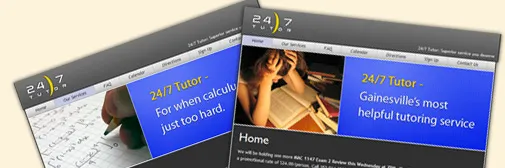
I just completed a web design project for 24/7 Tutor – a new Gainesville-based tutoring service for UF students. They let students call them literally 24 hours a day for tutoring in a growing list of difficult classes…

The site’s back-end is run by WordPress – I am very happy with using it as a complete, but cost-effective, content management system (CMS) solution. The back-end is not fool-proof (lot’s of things to click) but certainly is not too difficult for most clients. Most importantly, being able to take advantage of a such a well-written, open-source solution enables clients to have a CMS with little additional cost.

In addition to using WordPress, I integrated a Google Calendar, allowing the company to add events to a good-looking calendar easily through Google’s existing calendar website. Even more exciting is the fact that users of the site can then “subscribe” to the calendar, or copy specific events to their own personal Google Calendar.

Google Calendar is officially my second most-relied-on service by Google (search is #1, personalized home is #3). Even though it does have its share of problems, I now rely on it to pretty much run my life, since I switched from Outlook Calendar a few weeks ago.

Hopefully John, Tom, and Maxim from 24/7 Tutor are happy with the site – and hopefully it will bring them a lot of new business.

Edit: someone asked me if there’s really that big of a market for personal tutoring for a University. There certainly is. TutoringZone currently dominates the market I believe (although with a crappy web design), TutorGator looks like they just ripped off Facebook’s site design, and I know there is at least one other company.

Issues with Google Calendar

Update: Google responds.

Google has been doing a great job innovating lately through the integration of their products (Docs and Spreadsheets, Calendar and Gmail, etc). This integration, however, has not come without security issues arising. TechCrunch has covered several of them – but I believe I have found another…

This may be hard to believe, but I can view unauthorized and unshared events on my calendar. Let me explain:

My friend Bryan has a Google Calendar with the following security/sharing settings:

GCalendar Security - Bryans’s settings

Note that, as you would imagine, he only wants me to see free/busy information for his schedule.

And MY settings for HIS calendar are as follows:

GCalendar Security - Phil’s settings

The settings all look correct – I should be able to see only free/busy information about his events. But this is not the case – I can actually see all his event details.

I have had him unshare and reshare his calendar, with no better results. Luckily, Bryan and I are friends, so it is not a big deal that I can see his event details. But one can only imagine how this could be a big deal when your calendar has sensitive appointments.

I have to know – can anyone else reproduce this huge security bug?

Another problem I have with Google Calendar – and maybe I am not using it the way developers intended for me – but here’s what I do: I like to have different events in my life categorized in different calendars. Then, I can show/hide a certain set of events (personal, business, school, etc) quickly, and I can see by color coding how much time I am spending in each category.

The problem arises when I want to let someone else see my free/busy schedule on their own calendar. This means, not only do I have to share 5 calendars instead of 1, but that person then has to keep 5 calendars in their list. Why can’t there be a way to combine calendars into 1 for all my friends wanting to see free/busy status, or event event details? It is a big clutter for them to have 5 calendars just from mine to see when I’m free.

Lastly, I’m unhappy with the PDF that the Calendar generates to print both the month and week view. I am not against the idea of generating a PDF for printing complex designs – it is a good idea – but their implementation leaves much to be desired. The design and UI of the online version of the calendar is beautiful, however it seems as if the print layout was something thrown together a day before the product was to be released.

My biggest qualms are 1) it’s ugliness, 2) lack of details for events (it doesn’t even show the location of the event), and 3) lack of consideration for many events (when I have overlapping events sometimes it creates a box with no event name shown).

Google is doing a great job with many things, that is why when I notice issues like the above, it really stands out.

Update: Google responds.
Interesting School Projects

This semester has lended for some school projects a little different than usual. Some seem to be even… useful?

In “Speaking & Writing for Engineers,” I was required to write a resume and application letter to apply for an internship (optional on whether we actually sent the letter). Already being a step ahead of the class with an existing resume, this provided for a good time to produce an updated resume for your reading (and hiring) pleasure. I was sure to fill it with lots of buzzwords (yes, I do agree with Buzzwords say all the wrong things, in general) and acronyms, knowing that many companies these days simply scan resumes and run queries on their database for matching people. Additionally, I am going to be on both sides of a mock job interview soon to come.

Having an updated resume came just in time for UF’s Career Showcase – a two day event in which hundreds of employers speak with students about job openings in their companies. There were some big companies there and I got to meet a lot of recruiters. I spoke with a guy from Microsoft (with Windows Live) who asked me what AJAX really is. Not surprisingly, he said I was the only person so far that day that had a good grasp of it. (The “not surprisingly” is more from the lack of web-awareness of normal Computer Science/Engineering majors and less from the fact that I am just incredible).

In Java II, my latest project was to create an analysis, design, and implementation of a Travel Agency. We’re still doing simple console applications but are getting into different types of inheritance in Java. My UML diagram and screenshot below:

TravelAgency program screenshot

TravelAgency program UML

Facebook, part 3

Facebook – after recently getting a “facelift” with its News Feed (which delivers constantly updated information about your friends) and Mini-Feed (to show your friends what you have been up to) – has been up to a lot more. By opening itself up to anyone with any email address today, the once-exclusive social networking site can now be accessed by anyone. This is not big news though, Zuckerberg announced this would happen a while ago.

What I do find interesting, is how the site identifies users as unique…

As my friend Bryan Scott (of CampusTrade.com) recently mentioned, it is extremely easy for someone to get multiple email addresses. What is not easy to get is multiple cell phones. Therefore, if websites should use cell phones as unique identifiers to make it much harder for spammers and bots to abuse systems. Two weeks ago we were trying to figure out what that means for TapNote, and today Facebook is using the same idea.

Public email account users (those without a school or work email address) who do not confirm their cell phone address on Facebook can still do everything on the site. They are, however, required to enter one of those “are you a human” image codes every time they want to interact with someone on the website.

facebook-cell-verification

By doing this, Facebook has ensured that it stays spam-free, as it grows extremely quickly. I can only image where Facebook will be in another year. And I don’t just mean at Yahoo!.

“Facebook Notes”

Facebook, on a roll launching new features, just launched “Facebook Notes” which automatically imports posts from common blogging platforms (WordPress, Blogspot, even Myspace) and displays them in a new “Notes” section in your profile. Facebook automatically detects links in your profile to any supported blogging platform and allows you to import all yours posts.

Clearly Facebook is wanting to get into as many areas of social networking as possible, with the recent release of the Facebook API (developers.facebook.com). I’m glad they’re becoming more open, as well as trying to integrate with existing blogging platforms. Although I’m not sure quite what I think about their term “Notes,” I’m glad they are bringing blogging into an even more “mainstream audience”.

developers.facebook.com

Facebook just launched developers.facebook.com, allowing developers to interact with Facebook through an API. This is a great step for Facebook. It will increase functionality as developers create new applications and makes the system more “open”. At the time of writing, there are already 2 applications in the “product directory”. One creates a photo mosaic of your facebook picture with your friend’s faces. The other is an expense tracking program. Neither are too exciting as of now, but the possibilities have just been opened. Check it out:

developers.facebook.com
One key thing to note: the API does not allow the retrieval of member’s ever-so-crucial contact information (neither cell number nor email address).

My guess is Facebook is trying to protect its most valuable asset: a huge directory of contact information, while at the same time protecting its members from getting spammed as a result of the API. The API has a decent balance of allowing developers to do what they want, while still pointing a lot of traffic back to Facebook.com. For example, you call pull a lot of information about friends, photos, walls, and so on, but anytime you want to let a user actually do something on facebook (write a message, poke, make friends, etc), they have to be directed back to the site. This makes sense in regards to security and Facebook’s business model. Nobody can really screw up their own facebook account through a malicious API, nor can anyone easily create a Facebook competitor.

I’m looking for good ideas for an application using Facebook’s API. I have a couple ideas already in dealing with photos, which I may try and implement if someone doesn’t beat me to it. I’m just wondering how long until someone makes a Facebook “Hot or Not” website.

Edits:
Interesting: I just got my Facebook API key / “developer account” and was given an “app_id” of 151. So two products have been submitted to the directory, while 149 other people have received API keys already. It will be interesting to see how many of these turn into production applications, my guess is less than 5%.

I also like seeing the Facebook Developers Discussion Board. It’s getting to be active quickly and is a good place to keep an eye for applications in development.

I also believe Flock could benefit greatly from this by increasing its photo support from Flickr and Photobucket to include Facebook Photos, as well as notifications to wall changes, friend changes, etc. Note to self: email a flock community ambassador.

Internship with Yahoo! Completed

I have officially completed my internship with Yahoo! in Sunnyvale, CA for the summer and am back home in beautiful Jacksonville, FL. Overall I had an incredible experience and learned a ton. My eyes were opened to the large amount of tech start-ups and large companies in the San Francisco Bay Area. I got to see the office buildings of Yahoo!, Google, Apple, Microsoft, Cisco, eBay, Adobe, Altera, McAffee, WebEx, Facebook, Flock, and Meebo. You just can’t do that anywhere else. I always knew there was a Silicon Valley, but living in the area and rubbing shoulders with so many talented people in one area was a new experience for me.

I also got to work with talented engineers at Yahoo! and learn a lot. I was able to take a half dozen courses on various front-end engineering topics to either refine my skills or teach me new stuff while I was there. I was able to see what the workflow in a large organization (a company of 12,000 people) is like – the good and the bad – and work on projects for a company which impacts half of the world’s internet users every month. Yes, they are still more popular than MySpace.

Having intern events with nearly 200 other interns was fun too. It was great being able to meet and become good friends with a bunch of talented young people. Thanks to this crazy new toy called the “internet,” hopefully we will be able to stay in contact.

What now? Back to school and doing freelance work. I’ve got a decent school schedule this semester: Differential Equations honors, Applications of Discrete Structures, Circuits I, Java II, and Technical Writing for Engineers. I’ll be moving in my Gainesville apartment in about a week and will be building a loft for my tiny bedroom…. more on that later hopefully.

Freelance work is starting to come back on strong with a few programming projects starting up for designer friends. I just launched a new dynamic website for UF Campus Crusade. The site is a redesign of an aged site, now written with CSS and web standards in mind. While building upon the existing PHP backend, I have also added some new features and increased usability. I did not have time to do everything I wanted to on it this summer, but hopefully it will still serve as a great resource and advertising for the UF ministry of 300+ students.