On my goals list for 2013 was to write an eBook of some sort. When I was approached to join some other Backbone.js contributors in a “book sprint” to write a book on developing a Backbone.js application, I happily accepted!
The process went fairly smoothly (all things considered, when 5 people all write a book at once, mostly over a weekend). There were some challenges with timezones and schedules, but overall the team did a great job getting it done.
We started by building our sample project, Hubbub (a GitHub Issues tracker in a Kanban format), upon which we’d base the book. We wanted to build an app that was more complex / real-world than the typical localstorage Todo list example apps out there. You can see the final project live here.
You can read more about the book on the publisher’s site here: Developing a Backbone.js Edge, or buy it from one of these locations:
We use git and GitHub’s Pull Requests fairly heavily in developing Close.io sales software. My main problem with pull requests as code review is that it focuses my attention too much on the specific lines of code added/removed/modified, but not enough on the context of where they were added/removed.
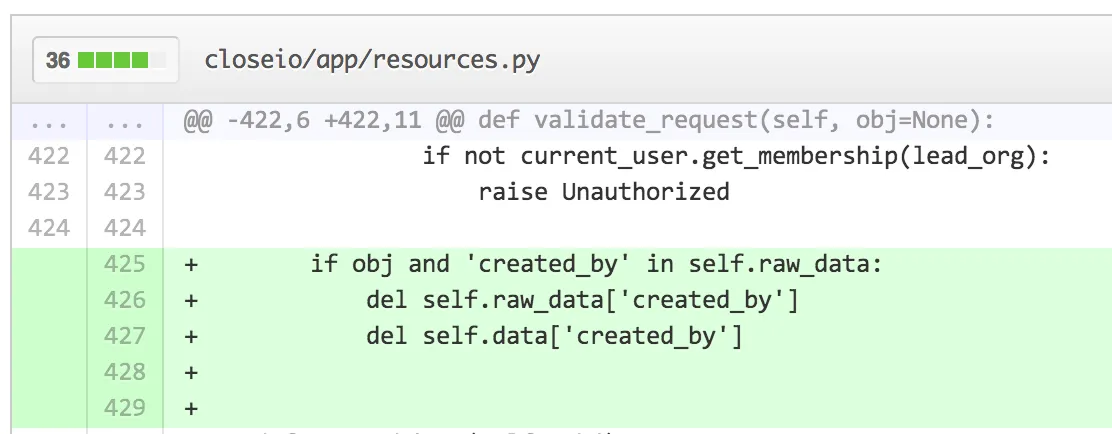
Take this view, for instance:
Sure, these 3 lines look fine — there are valid Python code and don’t contain any obviously flawed logic. And I can see which file it’s in (app/resources.py), and even the method name (‘validate_request’). But this very often isn’t enough for me to really review what’s going on. Do these lines make sense here? I have no idea from this view.
One reason is that seeing 2 lines of code above a change doesn’t really give me enough context even within a method. Another reason is that it’s not uncommon (especially in Python apps) to have a bunch of similar classes in the same file, that may all implement the same method names. In this case, how do I know which Resource class this code was added to?
Now, GitHub is just showing “git diff” which includes 3 lines (including whitespace) of context by default. But between git-diff’s additional options like –unified/-U (which allow you to show more than 3 lines of context) and –function-context/-W, as well as the ability for them to combine AJAX-ey goodness, there’s a lot of opportunity for improvement.
Here are some ideas:
No UI Approach: For starters, add a querystring feature like ?u=7, which would show me 7 lines of context instead of 3. They already do this with ?w=1 to show a diff that ignores whitespace changes and it comes in handy. This “no UI” approach is a no brainer, in my opinion.
Get fancy with JavaScript: See the little “…” above line 422 which represents all the extra code? This is the web… I should be able to click on the ellipses to expand the context. It could load in and display several extra lines of code when I click this to let me see additional context about the code I’m reviewing.
Get fancy with git: I’m not sure exactly how git-diff shows the function (def validate_request(self, obj=None): in this case) at the top of each chunk, but some intelligence could be added so that showed the class/object name in addition to the function/method names.
Can you think of a better way to solve this problem?