Archive for 2009

Book Review: “jQuery 1.3 with PHP”

I was given another book to review, called “jQuery 1.3 with PHP”, so here it is.  The book is aimed at beginners or intermediate developers wanting to learn how to “enhance your PHP applications by increasing their responsiveness through jQuery and its plugins“.

Chapter 1: Introduction & Overview, Chapter 2: Quick Tricks – Good chapter to teach beginners to both JavaScript, jQuery, and PHP the differences between client-side and server-side code, and how the jQuery framework fits into it all.

Chapter 3: Tabs and Accordions – At first this chapter looks to be nothing more than glorified examples of jQuery UI Widgets, but later it actually does a nice job showing how PHP can be used with these widgets to do server-side management of the tabs.

Chapter 4: Forms and Form Validation – Interesting and insightful way of validating forms (both on the client and server side, which is necessary) without having to duplicate all the validation rules.

Chapter 5: File Management, Chapter 6: Calendars – Very specific examples, but Ch. 6 uses the very nice jquery-week-calendar plugin to create an interface very similar to Google Calendar and shows how to link it up with PHP managing the events server-side.

Chapter 7: Image Manipulation – Another nice example of bringing using both PHP and jQuery plugins (treeview and jcrop) to create something really useful.  In this case an image browser, resizer, rotator, and cropper.

Chapter 8: Drag and Drop – Standard sorting/dragging examples + persisting data.

Chapter 9: Data Tables – Using the DataTables jQuery plugin with PHP on very large data sets.

Chapter 10: Optimization – A few helpful tips regarding caching, automatically merging .js source files, JavaScript code optimization, perceived user load times, etc.

Overall, if you’re a programmer not super familiar with PHP or JavaScript, this book does have some very helpful explanations with good examples.

One small gripe about the book: while I do know that black and white books are much cheaper to produce, reading code without syntax coloring makes it unnecessarily harder to understand.

To learn more or purchase: “jQuery 1.3 with PHP” by Kae Verens.

Graduation thoughts: best classes at UF for Computer Engineering

In three weeks from today, I will have graduated, with honors, from the University of Florida with a B.S. in Computer Engineering (software emphasis) and a minor in Business Administration.  Overall, I’ve had an incredible college experience and have learned a ton, had some great experiences, and built relationships with a lot of really great people.

I thought it’d be worth mentioning the classes at UF that, looking back, had the greatest impact on me.  I’ve taken a bunch of classes over the past 4.5 years, but these were the ones that I really can appreciate the most…


1.  Digital Logic & Computer Systems (EEL 3701), with Dr. Eric Schwarz

My breadboard from one of the Digital Logic labs

It wasn’t until this class that I really understood how computers worked.  I started this class as a freshman who could barely count in binary.  In one jam-packed semester, we learned all about: number systems, logic gates, mixed logic, k-maps, multiplexers, flip-flops, ALUs, RAM, ROM, etc.  We also learned how to design hardware components using Quartus and VHDL, and program them onto our PLDs to watch different LEDs on our breadboards react to various switches and buttons (see picture of my breadboard wired up after programming a PLD).

All in all, we started with simple logic gates and designed an entire (basic) 8-bit CPU – and then programmed it by writing and hand-compiling assembly code.  What a great learning experience!

This was also a great example of where it was completely worth taking the class with the harder professor who gives more homework, because he was very passionate about the subject and knew how to teach it well.  I don’t remember every detail of what I learned 4 years ago in this class, but because I had a great professor, I can still explain most of the major concepts and would feel comfortable diving back in if needed.


2.  Object-Oriented Programming (COP 4331), with Dave Small

This OOP class has had a greater influence on me as a developer than anything else ever has.  Heavily based on both in-class lectures (with reading assignments) and very large get-your-hands-dirty team programming assignments, the course was a great mix of theory and practice.

We went over many important topics such as encapsulation, inheritance, composition, cohesion, encumbrance, type conformance, Law of Demeter, Tell Don’t Ask, Open-Closed Principle, Liskov Substitution Principle, and MVC.  We also became deeply familiar with reading UML diagrams and sequence diagrams and used these to express complex software object models.

The real value from this course, though, came from the programming assignments.  We worked in groups of 7-8 people throughout the semester on three different iterations of a real-time role playing rage (RPG) in Java based on proper OO design based on what we had learned at that point in the semester.  We actually started from scratch for each of the 3 iterations, and, for each iteration, I spent about 90 hours outside of class working with my group on a solid UML design and implementing our design in Java.

These group assignments, even though they were very time consuming, had a huge amount of value in helping us turn abstract OO concepts into practice.  They were also very rewarding as we were creating a pretty cool game

A side effect was that I also learned a lot about teamwork and leadership, and working with a group of people under high-stress work environments.  They also were what caused me to really know Java well.


Runner Ups

  • Design Patterns in OOP (CIS 4930) – Dave’s other class.  I’d highly recommend it to anyone wanting to become a better programmer/designer.
  • Business Finance
  • Intro to Financial Accounting

Largest website width to support 1024×768 resolution

Currently, web designers are advised to support browser resolutions of widths 1024px and greater based on current browser usage data. The idea is that you want your site’s design to look good, and not require a horizontal scroll bar for those users. But screen resolution and browser width are not the same thing, because of browser chrome, scroll bars, and because many users browse without their window being maximized.

Common advice is that for the 1024 resolutions you have a maximum width of around 960 or 980px to work with. But if you really need to get every last pixel in, I can confirm test results from Windows XP running at 1024×768, with Internet Explorer 6.0 fully maximized, gives you a width of 1007px to work with.

* Of course, fluid layouts are also nice.

ExpressionEngine: “Freo Add-on Installer” makes installing add-ons a breeze

I wrote my first module for ExpressionEngine, called “Freo Add-on Installer”, with the aim of saving EE developers a lot of time.  Here’s what it’s all about.

[Jump to Download/Installation Link]

Each time you set up a website with ExpressionEngine you probably want to install several different modules, extensions, and plugins. Doing that usually involves downloading a .zip file for each add-on, then individually unzipping and uploading each file/folder to the corresponding modules/, extensions/, plugins/, language/, and themes/ folders. Then each time any add-on is updated, you have to repeat the process across all your websites.

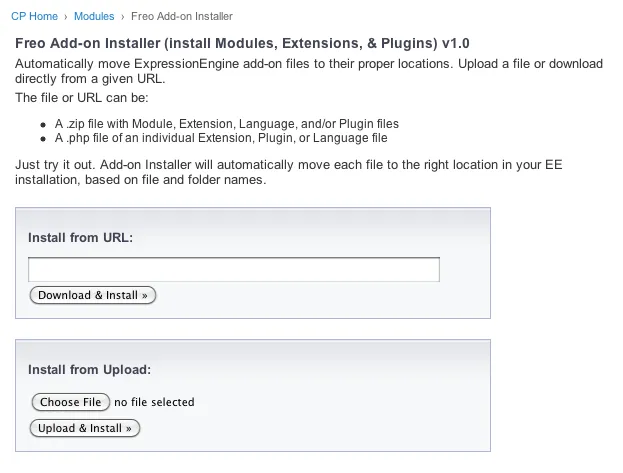
With my module, installing other add-ons is basically a one-click process. You just visit the module page (shown below) and then either upload a .zip/.php file, or give it the URL to the source from the developer’s website. Hit one button and my module takes the source file, extracts, and searches through the files and determines where each file/folder goes.

Screenshot:

Freo Add-on Installer for ExpressionEngine

For example, if you just upload a .zip file that contains a folder for a module, a pi.someplugin.php, and a lang.someplugin.php, all of the files will get extracted and moved to their proper locations. If it comes across a file it doesn’t understand, it will let you know.

Requirements:

  • ExpressionEngine 1.6.8
  • PHP cannot be in Safe Mode
  • You may need to change permissions for a few folders if instructed

These likely would only be a problem with some shared hosting companies. (If you need good ExpressionEngine hosting let me know).

Installation:

  1. Download freo_addon_installer_1.2.zip and unzip
  2. Upload the freo_addon_installer/ folder to your system/modules/ folder
  3. From the Modules page of your EE Control Panel, click “Install” next to “Freo Add-on Installer”
  4. If you’re running a version of EE older than 1.6.8, copy freo_addon_installer/language/english/lang.freo_addon_installer.php to system/languages/english/
  5. Please donate to support development of this and future add-ons.

Changes:

  • v1.2 – Bug fixes (Oct. 25, 2009)
  • v1.1 – Fixed problem when URLs redirect, like on github download zip URLs.  Added better support for installing fieldtypes for Brandon Kelly’s FieldFrame extension.  (Oct. 7, 2009)
  • v1.0 – Initial Release. (Oct. 7, 2009)

Ideas & Plans:

  • Create a long list of known add-ons to choose from so that installing will truly be one-click and not require looking up a source .zip URL.
  • Integrate with LG Addon Updater so installing updates will be more of a breeze.

Feedback & Support:

If you encounter any problems or have any ideas for improvement at all please let me know. Leave a comment below and let me know how you like it. This support thread in the forums is the best place to resolve any problems you may have.

Please donate to support development of this and future add-ons.

Book Review: “Magento: Beginner’s Guide”

I was given a copy of a book called “Magento: Beginner’s Guide” to review, so here goes.  Overall, the book does a good job of giving a high-level walkthrough of all the different aspects of running a store with Magento.

Chapter 1: Introduction, Chapter 2: Installation, Chapter 3: Categories and attributes – High level overview of Magento.  These chapters aren’t very useful if you’ve already used Magento at all, however for someone starting from scratch this would be a faster way of learning than going through the guides on Magento’s website. Chapter 3 is available as a free sample.

Chapter 4: Taxes – Very good chapter – I actually learned a lot.  It was very helpful as I am finishing up a Magento store right now and am about to configure taxes.  It discusses how tax rates and rules work in detail,  according to the product type and purchaser’s location.

Chapter 5: Adding simple products – Same analysis as Chapters 1-3.

Chapter 6: Minimum customization of your store’s appearance – Great for pointing beginners at where different files in Magento live and how to customize them.  However many of the tips for customizing the design will break if you try to update your site and default theme.  I’d recommend reading my post for Magento beginners before you start customizing anything.

Chapter 7: Beyond simple products – Helpful, although doesn’t provide much more information than is readily available on Magento.com.

Chapter 8: Customer relationships – About managing customer accounts. Configuring store contact options.

Chapter 9: Accepting payment, Chapter 10: Configuring shipping – Pretty thorough job of explaining different methods of accepting payments with the various gateways, and configuring all the different shipping options.  There’s a lot of details and explanations, so I’ll be looking back on this chapter again.**

Chapter 11: Fulfilling an Order – A walk-through of fulfilling an order. Discover your options for handling order fulfillment by observing the lifecycle of an order in Magento.

Appendix: Abbreviated step-by-step directions – A good idea for any book!

To learn more or purchase: “Magento: Beginner’s Guide” by William Rice

Magento eCommerce – First Thoughts & Tips

Magento is an incredible open-source PHP eCommerce platform built around the idea of flexibility, and has been gaining a huge amount of traction over the last 18 months.  Unlike “old” open-source solutions such as osCommerce, Magento was architected very carefully using OOP principles and MVC so that the entire system can be customized (both visually and functionally) without having to modify core application files.  This ensures that future updates aren’t a pain, and that multiple extensions can live peacefully together.

I’ve been working with Magento for over a year now, and overall I’m extremely impressed.  The architecture of the system is certainly very complex, but once you start to poke around and understand why there are so many different directories and files, and how everything is organized, you’ll love the flexibility that it creates.

The biggest complaint of Magento is the lack of documentation. From the wiki pages, to user guides, to source code comments, the documentation is severely lacking and often out-of-date.  I hope this improves over time (I think it will).  What I’ve found is that you can eventually figure things out, but the learning curve is just a little steeper than it needs to be.  It is pretty necessary to understand many core concepts of Magento (how XML layout files are used, how data is stored, how template blocks and functionality interact, etc.) in order to correctly make even the simplest of changes.  But once you get it, you can do a lot.  I think the CMS ExpressionEngine does extremely well at this, in comparison, and they are both products aimed at similar audiences.

When I started developing on top of the Magento platform, I kept a log of some of the help things that I learned along the way, that I wish I had known upfront.  Many of these tips seem obvious upon looking back, but I thought I’d share them for anyone just getting started programming or designing for Magento.

For everybody:

  • Use the Wiki, Knowledge Base, and forums
  • Don’t ever modify core Magento files! Seriously.  This quick article is a must read for all beginners.
  • To upgrade to a new version of Magento: just upgrade all of the components by using Magento Connect Manager.  This is found in the admin’s System menu, or by adding /downloader to the Magento home page URL.
  • To add Google Analytics: simply add your Analytics account profile’s tracking number under Config > Google API
  • To setup PayPal IPN: there is no need to change IPN settings in your PayPal account.  Magento automatically passes the IPN path with each checkout.
  • Refresh the cache! If you make a change and wonder why it’s not showing up, use the dropdown on System > Cache Management.  It’s helpful to disable the cache during development.
  • Learn how to customize via XML
  • After installing Magento with sample data and SEO URL rewrites, the same data shows up on the index page but many of the links are broken, even with my .htaccess file present.  Solution: Refresh catalog rewrites in Admin > System > Cache > Refresh catalog rewrites
  • Learn how to optimize and speed up Magento’s performance. It’s very slow by default but can be drastically improved. (I’ll be writing another blog post on this soon, but for now check out this thread.)

Design/theming tips:

  • Read the Design Guide
  • To figure out which template file to edit: turn on “Template Path Hints” through System > Configuration > Advanced > Developer > Debug > Template Path Hints = ON.  This option is only visible if you change the “Current Configuration Scope” dropdown to a website (like “Main Website”) rather than “Default Config”.
  • To switch to a theme (such as “Modern”), after downloading it in Magento Connect Manager, go to System > Design and then click “Add Design Change”.

Programming tips:

  • Understand the architecture
  • To debug and output PHP variables: set System > Configuration > Advanced > Developer > Log Settings- > Enabled = Yes.  Then, from a CLI in your web root do “cd var/log/” and “tail -f system.log”.  In PHP, you can say Mage::log(“hello world”); to write to this log.
  • Locate the PHP error log when getting a blank/white page, or an error message.  Mine was in public_html/error_log.

That’s all for now.  If you’re looking for a Magento designer or developer, get in contact with me.

Fixing Safari’s 1px background-image centering bug

I’m working on slicing and CSS for a new theming project for Magento Commerce and was plagued with a CSS bug that affects WebKit (Safari and Google Chrome).  After some searching I found that several other people have had the problem, but I didn’t see a comprehensive writeup of the solution.  Here’s what I found…

Bug description: When having a centered background image over a centered div (like a drop shadow over a main content div), the background image’s position would sometimes be “off” by 1px as the viewport in Safari, depending on the width of the viewport.  So half of possible viewport widths would show the incorrect version.  While 1px isn’t the end of the world, it can really hurt a design, and it’s nice to get center alignment in Safari/Chrome to work like Firefox/IE.

Example code:

body {
    background: #f8f8f8 url(../images/dh_bg.jpg) 50% 0 repeat-y;
}
div#everything {
    width: 980px;
    margin: 0 auto;
}

Partial Solution: First of all, always use an even-width background image – this way the rest of the browsers will get it right automatically.

To fix Safari we can apply a CSS hack targeted towards WebKit.  If your background image’s width is just a little wider than your main div, then this will fix it:

@media screen and (-webkit-min-device-pixel-ratio:0) {
    body {
        background-position: 49.999% 0;
    }
}

The problem with this is that if the viewport is resized to be a little larger than your div, but not as large as your background image, then the 1px problem comes back.

Real Solution:
So my solution is always use an even-width background image that is wider than the devices you want to support. I made mine 5000px wide (which is still < 1kb).  Then, the following CSS works great:

@media screen and (-webkit-min-device-pixel-ratio:0) {
    body {
        background-position: 50.001% 0;
    }
}

Hope that helps somebody.

Thanks to the helpful comments on Rob Goodlatte’s post (a JavaScript solution), which helped point me in the right direction.

Interesting TED Talk on Motivation

I listened to a very interesting TED Talk today by Dan Pink. You can watch it below or read my brief notes from it.

Source

Pink discusses several research studies on how typical reward-based motivation works very well for routine, mechanical tasks, but fails — and actually decreases performance — for tasks that require any kind of creativity.

The solution is to add intrinsic motivation for cognitive/creative tasks, which comes in three forms.

  1. Autonomy – an urge to direct our own lives
  2. Mastery – a desire to get better and better at something that matters
  3. Purpose – a yearning to do what we do in the service of something larger than ourselves

Traditional management is good for compliance, but self-direction is good for engagement.  He then goes on to tell a few stories of how autonomy has worked for companies in the real-world.

Summary:

  1. Traditional rewards do work, but only in a narrow band of circumstances.
  2. If-then rewords often destory creativity.
  3. The secret to high performance is the unseen intrinsic drive.

As I think about what projects I’ve felt especially motivated on in the past, I can definitely identify how I’ve been motivated by autonomy, mastery, and purpose.  I hope to seek, with more clarity, projects and work that have these characteristics.

Now I’m a PHP5 Zend Certified Engineer

I had a few goals for this summer away from school.  I wanted to go to some tech conferences, check out more startups and web companies in both Silicon Valley and closer to home in Florida, and continue with my freelance development work.  I also decided I wanted to take the Zend PHP 5 Certification test to learn more, see what I know, and to separate myself from every other kid who thinks they know PHP.

By the way, the thing I hate about PHP most is that, because it’s so easy to get started with, you can’t immediately differentiate between people who really know PHP (with a solid understanding of security issues, scalability, MVC, object-oriented programming, design patterns, etc.) and people who know just enough to be dangerous.  I’ve seen way too many websites written with PHP and HTML scattered together, SQL injection vulnerabilities, lack of code reusability, etc. This problem isn’t specific to PHP only, but I find the percentage of novice PHP developers to be far worse than, say, Ruby or Python developers.

So I looked through the “php|architect’s Zend PHP 5 Certification” study guide for the last couple days and took an online practice test.  I actually learned a lot of interesting things about PHP that I didn’t know – so it was a good experience.

Today I took the exam at a local testing center and am happy to announce that I am officially a PHP 5 Zend Certified Engineer (ZCE).

Zend Certified Engineer, PHP 5

By the way, if you’re looking to hire a good PHP developer, let me know (resume is here).  I graduate in December 2009.

Greasemonkey script: Facebook Reorder Sidebar

Hate scrolling down to see birthdays on Facebook? I just wrote a quick user script to reorder the parts in the sidebar on Facebook’s homepage.

Before: Requests, Suggestions, Sponsored, Highlights, Events/Birthdays, Connect
After: Requests, Events/Birthdays, Suggestions, Highlights, Sponsored, Connect

Step 1: install Greasemonkey (Firefox) or GreaseKit (Safari), and restart your browser
Step 2: install my Facebook Reorder Sidebar userscript
Step 3: visit Facebook and enjoy :)

Google I/O Keynote 2009, day 2

Google I/O 2009 Keynote, Day 2
4/28/2009

Google Wave – Product, Platform, and Protocol

  • Attempt to answer “what would email look like if it was developed today”
  • Combines Gmail, Translation, collaboration via Google Docs, Photos, etc., all in one
  • Because it is completely open, companies can host their own instances of Wave and Google never has to see the data – yet the users of separate platforms can still communicate with each other!

TechCrunch coverage
Google Wave
Google Wave APIs
Google Wave Protocols

I’m looking forward to WordCamp this weekend.  I’m curious to see if there will be any WordPress / Google Wave integration already.  Being able to have blog comments automatically pushed to users who aren’t actually looking at your blog would be a huge win.  If there’s no WordPress integration project already, I may just start one.

Notes from Google I/O Keynote 2009, day 1

Google I/O Keynote

Wednesday 5/27/2009

San Francisco, CA #io2009

Better liveblogging here: http://www.techcrunch.com/2009/05/27/live-from-google-io-2009/

100x improvement in JavaScript speed in the last decade

Firefox, Chrome, Safari, & Opera – all supporting HTML5 with Canvas, Video, Geolocation, App cache / database, Web workers

Canvas tag – supported in all but IE

Bespin – web IDE

Chrome profiler is built completely in HTML5

O3D – OpenSource 3d in JavaScript

Video tag – get video out of “plugin prison”

YouTube demo with <video> tag

Geolocation – supported in all browsers but IE

Mozillia VP – “A good API in 4 browsers is better than a perfect API in 0 or 1 browsers”

Google Maps will soon be adding a geolocation button

Announcement: Google Latitude on the iPhone in the browser using geolocation (WOW)

App cache / database – supported in all browsers but IE

Demo: with Safari – manifest file names cached application/graphics files

Demo: web app on Android with GMail in airplane mode – extremely fast

Web workers – threads in the browser – so JavaScript doesn’t completely freeze the browser

Demo: motion detection from the video tag all in JavaScript

===

Google App Engine

200,000+ developers, 80,000 + applications

Whitehouse app had 700 requests/second with no problem

Announcement: Java open on App Engine

Demo: develop an Ajax app in Eclipse (with Google plugin) in Java on both serverside (app engine) and client side (GWT) extremely quickly.  Just hit deploy (no FTP) in Eclipse.

Google Web Toolkit

Upcoming: Debug directly in any browser

Upcoming: runAsync() lets the compiler split up JavaScript files.  Example: 1.4MB to 200KB, compiler handled dependencies itself.

===

Google Web Elements (announcement)

Copy and paste website content:

Calendar, Conversation, Custom Search, Maps, News, Presentations, etc.

===

Android – coming soon new features

FREE ANDROID for everyone!

Standalone icons for Prism & Fluid: Gmail, GCal, & Wave

Today I tried Mozilla Prism (cross platform) and Fluid (mac only), both of which are used to create single-site browsers (SSBs).  I especially wanted to use them for GMail and Google Calendar since those are the two web apps I consistently have open in a tab at all times.

I’m still playing with them both but the first thing I realized was that they would have to do better than use the 16×16 favicons.  I was able to extract the official high resolution Google icons from the Google Gears desktop shortcuts for GMail and GCal, so they are attached.  These will work for Fluid.  For Prism, you’ll have to use the PNGs attached.

Later I found Chris Ivarson’s page with some great icons, but my first couple Google searches didn’t lead me there, and he doesn’t have the standard icons that come from Google.

Edit 1: By the way, I have chosen Fluid because its icon shows me my number of unread messages so I can keep it hidden when I don’t have new mail… very helpful.

Edit 2: By popular request, I just added a Fluid icon for Google Wave also

Attachments: gcal.icns gmail.icns google_wave.icns

gcal.png

gmail.png

google wave fluid prism icon

WordPress Plugin: Arbitrary Shortcodes

For a new project, I’m working on launching a large number of very similar WordPress installations with minimal effort. I needed a way to have WordPress automatically parse some kind of template tag or shortcode (like “[client_name]”) across all the different pages on the site. Not only that, I needed the field’s values to be easily updated in one place, and there would be an arbitrary number of shortcodes.

So I wrote my first WordPress plugin…

Here’s a description of it:

This plugin allows you to write your page content like this: “Contact our company, [company_name], by email at: [email].”

Text with these shortcodes can be defined on any number of pages throughout your site.

The values of all of the shortcodes are controlled in a single location: the Custom Fields of your blog’s home page. For the above example, there would be Custom Fields on the home page called “company_name” and “email” with the values, respectively, of “Example Company Name” and “info@example.com”.

This plugin requires that you have WordPress set to show a static Page on the home page under Settings->Reading and “Front page”.

So then, for all the custom fields entered on the home page, this plugin looks for shortcodes (in all pages) and replaces each of their values, upon output, with the relevant custom field value.

This is useful for if you want to fill many pages with text that includes an arbitrary number of shortcodes or template text and have all the values can be replaced in one place.

You can download it from the plugin page, or just grab the SVN.

Random WordPress notes:

  • I highly recommend always installing WordPress by svn – it’s easy (faster than uploading) and makes updates a breeze.  If you want to get fancy, you can also install your plugins by svn through svn:externals.
  • If you want to make the process go really quickly, take a look at wp-create.sh.  I’m using this (plus other tools) to setup WordPress installations in no time.
  • I just found out about /wp-admin/options.php for the first time – very handy way to see/edit all saved options at once.
  • I also just registered for WordCamp 2009 in San Francisco… looking forward to it!

On OSX, svn: This client is too old to work with working copy ‘.’; please get a newer Subversion client

I got this message when trying to use Subversion on OS X through Terminal.

I checked out my svn version using “svn –version” and it said I was using 1.4.4 – so I decided to update. Here’s how…

Download the latest SVN binaries for OS X and install them just like any other program:
http://svnbinaries.open.collab.net/

Update your system wide path settings by editing /etc/profile through the Terminal:

$ cd /etc/
$ sudo vi profile

At the top of the file, add the following line of text, then save and quit vi.

export PATH=/opt/subversion:$PATH

Then rename the old binary:

$ cd /usr/bin
$ sudo mv svn svn.old
$ cd ~
$ svn --version

And you should see the later version (mine is 1.5.5) and all is good.

Thanks to http://www.imarichardson.com/2008/10/06/osx-svn-woes-client-is-too-old-to-work-with-working-copy/

Upgrading MySQL, PHP MySQL Client Version, phpMyAdmin

Some mental notes for myself in case I encounter this again, and maybe this will help someone as I was doing Google searches trying to figure this out myself…

I have a server with ServInt, which runs WebHost Manager (WHM) and cPanel.  I logged into phpMyAdmin and it said I was running MySQL 4 instead of 5.  Wanting to upgrade to MySQL 5, I went into WHM and used cPanel->Upgrade to Latest Version and Software->Update Server Software.  This updated everything just fine and it said I was running MySQL 5 (and doing “SELECT VERSION()” returned 5), even though phpMyAdmin still did not report v5.

I assumed the fact that I was running a very old version of phpMyAdmin was the problem.  Since I couldn’t find anyway to automatically upgrade phpMyAdmin in WHM/cPanel, I did the following, which tries to use your existing phpMyAdmin config file:

# wget -O /usr/local/cpanel/base/3rdparty/phpMyAdmin-3.1.2-all-languages.tar.gz http://dfn.dl.sourceforge.net/sourceforge/phpmyadmin/phpMyAdmin-3.1.2-all-languages.tar.gz
# tar xzf /usr/local/cpanel/base/3rdparty/phpMyAdmin-3.1.2-all-languages.tar.gz -C /usr/local/cpanel/base/3rdparty/
# cd /usr/local/cpanel/base/3rdparty/
# rm -f phpMyAdmin-3.1.2-all-languages.tar.gz
# cp -R phpMyAdmin phpMyAdmin-backup
# cp phpMyAdmin/config.inc.php phpMyAdmin-3.1.2-all-languages/config.inc.php
# mv phpMyAdmin phpMyAdmin-old
# mv phpMyAdmin-3.1.2-all-languages phpMyAdmin

And then I got an error in phpMyAdmin, and seeing nothing significant in my old config file, did this to use the sample that comes with the new version:

# rm phpMyAdmin/config.inc.php
# cp phpMyAdmin/config.sample.inc.php phpMyAdmin/config.inc.php

Then phpMyAdmin worked just fine, and the new version differentiates between Server version (which was now correct) and PHP Client version (which didn’t sound right).  I checked phpinfo() and the PHP MySQL client version was 5, but I read that I would have to recompile PHP.  I took the opportunity to upgrade from Apache 1 to 2 and to the latest release of PHP 5, all done using EasyApache under WHM->Softare.

With PHP upgraded and recompiled, I then went ahead and launched phpMyAdmin again.  It still gives the warning, “Your PHP MySQL library version 4.1.22 differs from your MySQL server version 5.0.67. This may cause unpredictable behavior.”, which is what I was trying to get rid of, but now I give up.  I know my MySQL client and server versions are both 5, so if anyone knows how to fix that warning let me know.

Let me know if you know why phpMyAdmin gives this warning.

PS, I also did this:

#vi phpMyAdmin/config.inc.php

and added a random string under blowfish_secret.

Switch to MacBook Pro and OS X

A couple months ago I bought my first Mac computer with the release of the new MacBook Pros. The new machine is beautiful and the switch to OS X from Windows has been primarily positive overall.

There were a few things from Windows that I greatly missed, but I found solutions which worked:

Make Safari open new windows in new tabs (especially links in Gmail messages), just like Firefox: http://hetima.com/safari/stand-e.html

My Bluetooth Mouse was extremely difficult to use with the OS X mouse acceleration settings.  Fortunately after trying several options I found a program that fixed the problem for me: http://www.usboverdrive.com/

Create “new document” context menu option in Finder to create a quick way to make a new Word document or Text document in a specific folder: http://www.growlichat.com/NuFile.php

Combine multiple buddy lists into one in iChat: http://www.ksuther.com/chax/

Quickly lock your computer like Windows Key + L: http://www.gkoya.com/2006/11/23/locktight-for-mac-os-x-intel/