Archive for 2013

My IKEA standing desk

I’ve been wanting a standing desk at home, ever since our old Elastic office had standing desks. The key though is getting it to be the perfect height, and not spending a fortune. After some careful measurements I determined that my standing desk surface should be exactly 40″ from the ground, so that my arms at ~90 degree angles would fall perfectly on them when I’m standing (I’m 5’6″ or 5’7″).

Luckily I had an existing GALANT Ikea adjustable desk ($150 new), which can get pretty tall on its own (almost 35.5″). So the trick was to find something sturdy to stick the legs on that was at least 4.5″ tall. Turns out these $10 bed risers will do the job perfectly! Bed risers come in various heights and sizes but these are perfect since they raise the desk 5.25″ and the insets are big enough for the GALANT desk legs to fit.

So, if you’re looking for a cheap standing desk setup, I’d recommend the GALANT from Ikea + these bed risers, and you can have a simple standing desk up to about 41″ tall.

You likely need to raise your monitor up so that it’s at the correct eye level when your head is straight. I’m using books but they also have monitor stands that let you put stuff underneath.

I also recommend a laptop stand like this $33 Griffin Elevator Laptop Stand to raise your laptop (as a second monitor) to around the same height.

It’s a bit messy… but here’s the final product:

My Ikea Standing Desk

How to view a color diff of text from two PDFs

I recently had to look at two different legal documents (PDFs) that were mostly the same, but I wanted to spot any differences.

My first attempt was to install the cross-platform GUI tool DiffPDF. This mostly worked but was annoying because it seemed to basically only diff within a page – so if your paragraph bumped to another page in the new version of the document, you couldn’t really spot changes.

Then I installed pdftotext with macports: “sudo port install poppler”. From there you can diff the two text files, like normal.

However the format was still not ideal in the standard FileMerge, “diff” or “vimdiff” programs (even with ignoring whitespace) because it would show an entire paragraph changing even if just one word did. And it would also show issues in all the places where text wrapping happened on. different words

So finally I found a couple other useful tools, wdiff (for word-by-word rather than line-by-line comparisons) and colordiff to colorize the output. Installed with: sudo port install wdiff colordiff. And threw in a trick to avoid needing the .txt temp files.

$ wdiff <(pdftotext old.pdf -) <(pdftotext new.pdf -) | colordiff

Beautiful! Now I can easily spot the specific words, nicely colored, that have changed.

Only thing I would improve is for it to print only the lines with changes (plus 3 context lines above/below), rather than all lines.

Sweating the UI & UX details in Close.io: Emails & Email Addresses

My blog post on the Close.io blog was pretty popular (18,000 pageviews & lots of HN comments) so I wanted to cross-post it here:

Sweating the UI & UX details in Close.io: Emails & Email Addresses

We like to think of our sales software, Close.io, as having a lot of magic under the hood. When we do our jobs successfully, our users may not even notice, but their lives will be made a little easier. We try to make features just work without requiring users to think too much, even if that adds complexity in code.

Here are a few examples:

1) Entering contact details

Most CRM and address book software make you enter your contacts’ phone numbers, email addresses, and URLs in specifically chosen separate fields per data type.

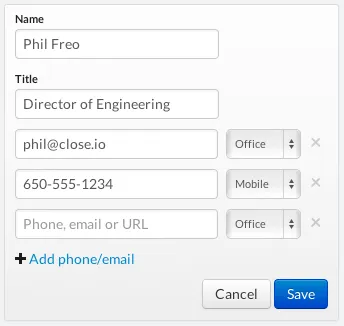
We realized this sucked and now give you a contact form like this:

image

You shouldn’t have to make a choice for each phone number, email address, or URL you enter for a contact. We just give you one place to enter all their contact information and we figure out what type of data is what. (Then you can 1-click call or email this person).

Is taking a string and deciding if it’s either a phone number, email address, or URL particularly hard? No, but it’s “hard enough” that most CRMs and address books don’t do it, and we wanted to take the extra time to make our users’ lives easier, even if they don’t notice it.

2) Pasting contact email address

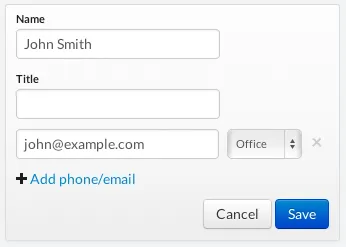
A recent iteration on the contact form was improving a fairly common scenario where you had email from somebody and wanted to save their email address onto a contact. Many email clients give you a string like: “John Smith” <john@example.com> when you copy the address. Originally if you tried to enter that as an email address in Close.io it would complain about it not being in the simple email format like john@example.com.

Now, when you paste that text into the email field we’ll automatically pull out the email address part and fill in the contact’s name field if it’s blank:

image

Again — not particularly difficult, but something most software doesn’t do. This is the type of magic that many users won’t even notice or think twice about, but helping users avoid validation error messages is as much of a benefit as any new feature you could make.

3) Zero configuration email sending

The first few times you try to send email in Close.io, it’s as simple as clicking the big “Email” button on a sales lead, typing a message or choosing a template, and clicking send. We already know your email address when you signed up, and we use our own Mailgun account to send email as/from you, so that it just works.

We do put a cap on the number of emails you can send without entering your own SMTP credentials (which will also give you better email deliverability), but for users just checking out Close.io, it’s one less configuration step in the beginning.

4) Magic email tracking from all your email clients

Forget having to BCC/Foward all emails with sales prospects to some random CRM email address. Plug your IMAP credentials once into Close.io and we automatically track your sent and received sales emails regardless of how/where you send them.

Much more to do…

We have a long list of other little UI/UX improvements we need to make, but hopefully this was enough to encourage you to think twice about the tools you’re using and discover opportunities for improvement.

And if you’re a software developer… be sure to sweat the details – it takes more time, but it makes for happier users!

We’d love to hear your reactions… follow @closeio and @philfreo

– Phil Freo

My Backbone.js book published!

On my goals list for 2013 was to write an eBook of some sort. When I was approached to join some other Backbone.js contributors in a “book sprint” to write a book on developing a Backbone.js application, I happily accepted!

The process went fairly smoothly (all things considered, when 5 people all write a book at once, mostly over a weekend). There were some challenges with timezones and schedules, but overall the team did a great job getting it done.

We started by building our sample project, Hubbub (a GitHub Issues tracker in a Kanban format), upon which we’d base the book. We wanted to build an app that was more complex / real-world than the typical localstorage Todo list example apps out there. You can see the final project live here.

You can read more about the book on the publisher’s site here: Developing a Backbone.js Edge, or buy it from one of these locations:

Thanks to Casey Foster, Aidan Feldman, David Tonge, and Tim Branyen for co-writing it with me, and for Troy Mott for organizing the book sprint.

And now for some SEO love… I hope this book will become one of the best selling Backbone.js tutorial books out there!

The problem with pull requests / code reviews

We use git and GitHub’s Pull Requests fairly heavily in developing Close.io sales software. My main problem with pull requests as code review is that it focuses my attention too much on the specific lines of code added/removed/modified, but not enough on the context of where they were added/removed.

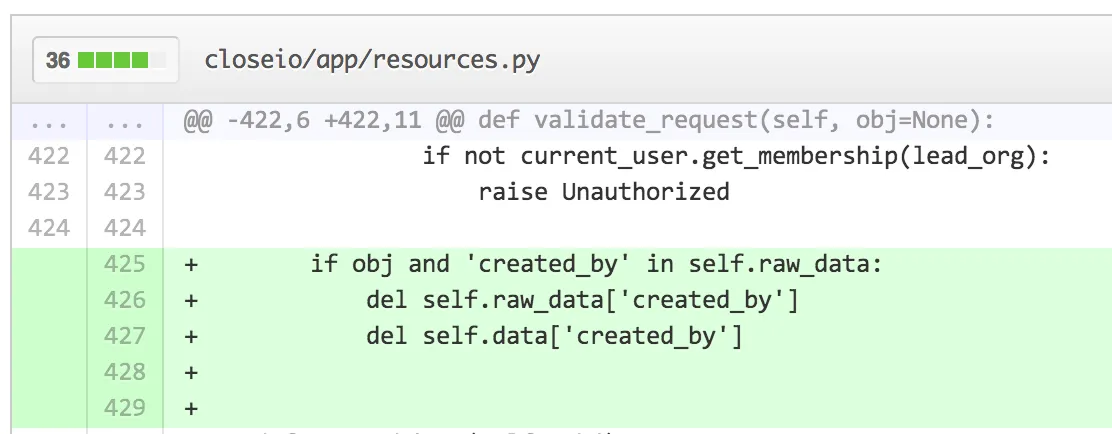
Take this view, for instance:

Sure, these 3 lines look fine — there are valid Python code and don’t contain any obviously flawed logic. And I can see which file it’s in (app/resources.py), and even the method name (‘validate_request’). But this very often isn’t enough for me to really review what’s going on. Do these lines make sense here? I have no idea from this view.

One reason is that seeing 2 lines of code above a change doesn’t really give me enough context even within a method. Another reason is that it’s not uncommon (especially in Python apps) to have a bunch of similar classes in the same file, that may all implement the same method names. In this case, how do I know which Resource class this code was added to?

Now, GitHub is just showing “git diff” which includes 3 lines (including whitespace) of context by default. But between git-diff’s additional options like –unified/-U (which allow you to show more than 3 lines of context) and  –function-context/-W, as well as the ability for them to combine AJAX-ey goodness, there’s a lot of opportunity for improvement.

Here are some ideas:

  • No UI Approach: For starters, add a querystring feature like ?u=7, which would show me 7 lines of context instead of 3. They already do this with ?w=1 to show a diff that ignores whitespace changes and it comes in handy. This “no UI” approach is a no brainer, in my opinion.
  • Get fancy with JavaScript: See the little “…” above line 422 which represents all the extra code? This is the web… I should be able to click on the ellipses to expand the context. It could load in and display several extra lines of code when I click this to let me see additional context about the code I’m reviewing.
  • Get fancy with git: I’m not sure exactly how git-diff shows the function (def validate_request(self, obj=None): in this case) at the top of each chunk, but some intelligence could be added so that showed the class/object name in addition to the function/method names.

Can you think of a better way to solve this problem?

The startups and services behind Close.io

Originally published on the Close.io blog.

The startups and services behind Close.io

In creating Close.io software for salespeople, we rely on a number of other startups and services to do what we do. While there are alternatives to using each of the following, we have chosen them for specific reasons because we think they’re the best.

The common theme is that these services allow us to move faster and have better insight into our business. We could live without any of them, but it would mean slower iteration and less innovation.

Powers our app

Plivo – Powers the backend telephony behind Close.io. We chose them over others like Twilio because of their low level sip telephony support, as well as their commitment to call quality.

AWS (EC2, ELB, S3, CloudFront) – Let the big guys handle our server infrastructure. Best AWS decision we’ve made is to host out of Oregon instead of the east coast, since almost all of the significant downtime AWS has had in the last year has been in Virginia.

Heroku – Used to host our static Close.io homepage because there’s really no simpler way to get a Flask/Python app deployed.

Technical insight & debugging

New Relic – Great way to monitor app server performance and server health. Expensive but worth it.

Errorception – JavaScript error reporting. It’s not fancy, but JS error collection/reporting is an art and they know what’s up.

HockeyApp – Mac app crash reporting

User analytics & retention

Customer.io – Used for automatic drip marketing emails. By plugging in our Google SMTP credentials to send from, our marketing emails automatically get logged into Close.io so we can see all emails sent/received to our contacts.

Mixpanel – Used for user + event tracking within our app

Google Analytics – Used for overall traffic analysis

Tip: best decision here was to use Analytics.js which allows us to easily try out different analytics services with only a single line of code changed.

Development

GitHub – Best UI out there for code reviewing. Also heavily use GitHub Issues. Check out our open source contributions.

CircleCI – Upon every code push to GitHub, Circle automatically runs all our Python and JavaScript unit tests. If something fails, our engineering chat room is pinged. If tests pass in master, the latest code is automatically deployed to our production servers. Circle definitely beats running your own Jenkins CI server.

Communication

Campfire – Used for both internal team communication (and integrated with GitHub, New Relic, CircleCI, Close.io, etc.) as well as the “Live Help Chat” link from within our app where we provide technical support and get feedback from customers. While it’s been neglected, we like using the Propane app compared to the web client.

Olark – Used for “Live Help” on the Close.io homepage. Pops up in the team’s IM client when someone needs help.

Google Apps – Easiest way to get a team going with email, calendar, etc.

Money

Stripe – A modern API for credit card processing.

Integrations

Zapier – We can’t integrate Close.io with every possible service, so we’ve created a Close.io Zapier App that allows our customers (and ourselves) to integrate with other services across the web.

Sales (& Telephony)

Last but not least, we eat our own dogfood by using Close.io for our sales process of keeping track of all customers and prospect data, and calls / emails with them.

What’s Needed?

The section that I think is missing from other similar blog posts as this is “what’s missing?”. Here are some areas that I think need more startup effort.

  • Better user analytics. Mixpanel (and others we’ve tried) are good for some simple analytics but just don’t allow us to easily answer many of the higher-level questions we’d like to answer about usage (“which users fit X usage patterns”, “how many people fit Y criteria over time”, etc.). The data could be there, but the backend intelligence isn’t. Improvements in this space could really help both the sales process as well as product development processes.
  • Better web integrations. We’d love to plugin a service that helps us help our users get their existing data into Close.io from many of the existing services out there.
  • Better financial software. Stripe is great, but it’s pretty low level. For anything slightly complicated you still have to build your own system of database+code to manage subscriptions and invoices. Perhaps a combination of an open source library + an accounting/reporting service is needed.
  • A non-Google email/calendar solution. There seems to be a lack of great alternatives for startups.

Any other great services we should be using? Tweet us at @closeio

– Phil Freo (@philfreo)

End of 2012 Review

At the end of a year I like looking back and seeing what I’ve accomplished and what new technologies I started working with in the year. Here’s a little summary.

Company

I started 2012 in a new role at ElasticSales to lead the product/engineering team, working on software to make better software for sales people. It’s been a great year and I’ve gotten to learn a lot of stuff and work with a great team.

ElasticSales.com – Designed a company website to show credibility for our sales as a service business, help with hiring, etc.

Close.io – Launched the sales application we’ve been working on for months (and I launched this website for it). Designed completely different from traditional CRMs like Salesforce, Pipedrive, etc. it’s focused on helping with sales communication rather than just being a database. It does this by automatically logging all calls and emails (incoming and outgoing) in one place to remove the typical data entry associated with CRMs. Also making it much more beautiful and fast than those legacy sales apps.

A big goal for 2013 is to make Close.io a huge success as a profitable SaaS service that people love.

Design

I added 12 shots on Dribbble in 2012. Though most of my “design” work was simply trying to make good user experience in Close.io.

Front-end Development

Backbone.js – I had significant experience working on big JavaScript projects before 2012 (using vanilla JS, jQuery, MooTools, etc.), but hadn’t used a higher level framework like Backbone.js. In the past 12 months I’ve been primarily doing front-end development and built two large apps using Backbone. I’ve also been able to contribute a few patches, features, and unit tests to the project. I love the framework because it seems to provide just enough structure to be useful everywhere without too much bloat. It’d be hard to imagine making another client-heavy web app without using something like Backbone.

Along with writing a bunch of code specific to Close.io, I’ve become deeply familiar with several Backbone add-ons:

  • Backbone-Forms – Auto-generate HTML forms that sync with Backbone models. I’ve been able to contribute significantly and help triage pull requests and issues for this project.
  • Backbone-Relational – Adds relations between Models & Collections. I contributed significantly to this project as well.
  • Backbone.Declarative – Adds a declarative syntax (similar to how Backbone DOM events work) for binding Model/Collection events to Backbone Views. I helped rewrite this project to work better with Backbone 0.9.9.
  • Backbone-Super – Nice syntax for calling “super” for friendly OOP-like functionality
  • Backbone.Stickit – 2 way DOM <-> Model binding
  • Backbone.InfiniScroll – Infinity scrolling in Backbone Views
  • Backbone.Mousetrap – I wrote this as a better integration of Mousetrap (JS keyboard library) in Backbone Views.
  • Backbone.Mutators – Provide getter/setter support on Backbone Models. Started with this project though ended up writing my own implementation that I thought was better.

Grunt – Useful command line / JavaScript-based tool for creating tasks for minifying, concatenating, compiling JS/CoffeeScript, etc. Used heavily in our deploy process.

RequireJS – I’m using RequireJS heavily to keep our application nicely organized into modules, with dependencies declared explicitly.

LESS – extends CSS with a better syntax, mixins, variables, etc.

QUnit – I got much more serious about front-end / JavaScript unit testing this year, as well as better at testing in general.

Bootstrap – used as a base set of styles and core mixins. Great when using LESS

Several other front-end JavaScript projects, jQuery plugins, etc. Most of my open source work is done via Elastic’s GitHub.

Back-end Development

Python – In 2012 I went from only know a touch of Python to feeling comfortable writing significant amounts of code in it. I added plenty of features and fixed plenty of bugs. I’d definitely use Python instead of PHP now for new projects and am a big fan of its simplicity and syntax.

Django – I spent several months working on a Django project. I got deep into Django and used various add-ons for it. For any significant traditional web app written in Python, I’d still recommend using Django.

Flask – I’ve written 4 or 5 projects using Flask now and love it for its simplicity. We’re using Flask for Close.io and are using several extensions (that we wrote and 3rd party). My team wrote Flask-Mongorest which especially has made writing a MongoDB-backed JSON REST API super convenient.

MongoDB – I’ve learned a good bit about using MongoDB, and some of its best practices, as well as its gotchas.

AWS – I’ve used several AWS services before 2012, but this past year led to much more significant experience using EC2, S3, RDS, Route 53, ELBs, etc. I’ve deployed several different services using both raw AWS as well as Heroku now, and love the flexibility and ease for creating scalable systems.

Blogging

I redesigned my personal website/blog this year for the first time in 6 years! I also had 13 blogs posts this year, which is pretty good for me, as well as a guest post on TechCrunch. Here are my 2012 blog posts:

I’d like to do shoot for at least 13 posts in 2013 as well.

Personal

It was a big year for me. I started a new job at Elastic, started a life with Kristin after getting married on New Years Eve, moved to a new apartment in a new town, and started attending a new church! Let’s hope 2013 is as exciting!