Archive for 2015

Don’t punish old trials and former customers

A common pattern in SaaS apps is to allow a free trial period of 2 weeks or 1 month, and then to require a credit card to use it any longer.

Either out of curiosity or out of a genuine need for a tool that some SaaS service is offering, I will often sign up for a free trial soon after learning about it in order to check it out. For a variety of reasons by the time the free trial is up, I’m not ready to purchase.

It could be because I was just poking around. But more often it’s because I got too busy. Or my reason for signing up didn’t stay a high enough priority to be ready to purchase and fully implement some solution. Or maybe because the product just wasn’t far enough developed to satisfy what I was looking for.

What I find happening is that 3, 6, 12, or 18 months later I’ll find myself thinking about this tool. Perhaps the problem that led me to originally check out tools of the service has become more pressing than ever before. Or perhaps I’m fed up with another tool I chose, and am searching again for a better option. Or I’m hoping that the product has evolved more. Or whatever.

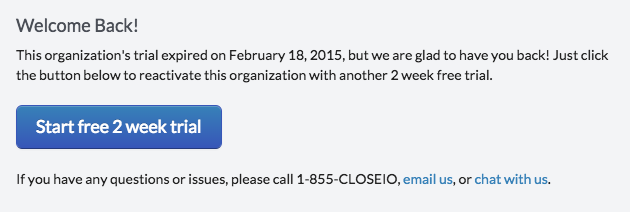
When logging back into your previously-created account, what you typically see is something like this:

Your free trial expired. Please enter your credit card to continue.

At this point, it’s far too easy to just close the tab. I’ve done it many times, even when I actually was in need (and willing to purchase) a tool in their category.

Savvy users will email the site’s sales or support team and can usually get a trial extended, but this often takes a few hours, which sucks. When a user gives you enough attention to want to check out your product right now, you should always take advantage of that. It’s too easy for that attention to get lost if you make the user wait.

Similarly some users will just use another email address, which is really bad for understanding your marketing funnel and metrics, and is a bad user experience overall. Plus, this may mean losing whatever progress was made on the first trial.

Let’s stop punishing our older trials.

I always thought this was a bad user experience, but I knew we were guilty of doing the same thing at Close.io. Not anymore. Now if you login to a trial that has been expired for long enough (i.e. you haven’t checked out the product in a long time), we give you a single click to get started again.

Screenshot 2015-08-04 14.50.22

The same applies for former customers. Once you’ve been around a while, it won’t be uncommon for an early adopter to have churned and then want to give you another shot a year later. We should welcome this!

It’s a super easy change to make and within minutes of pushing this change we already saw its effects pushed to our chat.

Screenshot 2015-08-07 16.53.17

Don’t treat old users worse than new trials!

Why you should Archive your emails when you’re done with them

There are two types of people in this world:

  1. People who archive incoming emails when they are finished with them, and try to achieve “inbox zero”
  2. People who leave all incoming email in their “inbox” forever but use “Mark as Unread” or Star/Flag message to indicate items still requiring action

If you’re a Type #1 person, you can stop reading now.

If are a “never archive anything” type person, I’d like to make a case for why you should become an “inbox zero” type person and archive emails when you’re done with them.

You may be thinking, “who are you to tell me how to manage my email!?” It’s true, I have no right to that, and I understand that different people have different workflows. But I have heard all the reasons and still strongly believe all Type #2 people would be better off if they become Type #1 people.

I have made my case to several people over the last few years and all of them that have ever tried it have thanked me later. I believe there is really no downside to becoming a Type #2 person and only upside.

I know that not everybody is used to archiving their email, but I’d like to make a case to you that it’s not any more difficult and that if you give it a shot, it will really help your workflow. First, let me address the top 3 reasons people usually give for why they don’t archive currently:

“Archiving is an unnecessary extra step”

The thing is, it’s not really an extra step to archive an email once you’re done with it! From Gmail it’s a single keyboard shortcut or a single click of the Archive button. You’d have to click Back anyway so it’s 0 additional steps to archive a message instead.

“I keep emails in my inbox so I can find them later easily”

Emails are still searchable even when archived, and you can see all those messages in Gmail under All Mail. Archived mail is not lost, it can still be easily browsed and searched.

“I treat ‘unread’ or ‘starred’ messages as my actionable items list, which is just as good as archiving”

Abusing the “Unread” feature to keep emails around that you actually did read but just haven’t finished handling / responding to yet is unwise for two reasons. First, it prevents you from having a true list of actually unread emails.

Second, using Unread status or Stars/Flags to indicate actionable items means that your inbox is a mix of “emails I’m done with” and “really important emails I shouldn’t forget to handle or respond to”. Those items are interspersed. Sure, having items as bold (unread) or starred can make the important ones stand out, but what happens if you don’t remember to handle them before they end up on page 2? With an infinite inbox, it’s too easy to lose messages that you saw but didn’t handle yet.

Even if you always handle these items before they get too far back in your inbox, it means you’re doing lots of extra mental work by having to continually scan your inbox for items that need handling. You have to keep seeing the already handled items unnecessarily which means more things for your brain to process. Wouldn’t it be better if there was a single concise list of emails requiring further action?

Why archiving is better…

We’ve established that there’s really no downside to archiving all email once you’re done with it. Let’s talk about the upside.

When you archive messages you’re finished with, what you’re left with is an inbox that consists only of actionable items. No more continually re-scanning past dozens of emails that are no longer important, in search of the one you need to reply to. No more lying to your email client saying you haven’t read an email after you really have. No more losing important emails in the stream.

Archiving makes your inbox the list for all your emails requiring action, and nothing else.

I bet if you give it a shot, you’ll like it within a week.

How to get started

Start out by doing a bulk archive of everything in your inbox that you know has been handled. In Gmail there’s a Select All checkbox, then a second link appears at the top to truly select all. Then you can click Archive.

When a new email comes in, of course you first need to read it (or at least skim the subject/sender). If you decide you’ve read enough and it requires no action, then simply hit Archive! If you’re done your part and replied to a message, hit Archive! If the email represented a task and you finished the task, hit Archive! If it’s a newsletter and you finished reading it, hit Archive! (If it’s a newsletter or promotional email you never care to read, then Unsubscribe… and then Archive!)

Now, you can look at your inbox anytime to see and handle emails that still need more reading, responding, or action.

Let me know how it goes!

– Phil

P.S. The best products, in my opinion, encourage an opinionated workflow that promotes success. It’s from this workflow that we built Inbox in Close.io, which syncs your CRM and your email account for an Inbox of actionable sales-focused items.

The last 20% before shipping

What makes a new feature or product update “done” versus what makes it “really done”? At  Close.io we developed our own process to answer this question, based on years of shipping new features for our sales communication platform. Today, we want to share this checklist with you.

As soon as a new feature you’ve built is running and working on your development server, there’s a strong temptation to think it’s “done”. You want to ship it. After all, the code is working, and you know many of your users would benefit immediately from the change.

It’s important to stop and ask yourself: What else should we do other than just making a new feature functional? How can I improve the experience for users or make this feature more accessible and maintainable?

We’ve learned that when you’ve only gotten a feature working, you are at most “80% done” and that the last 20% really makes all the difference. In fact, sometimes the “last 20%” of polishing a feature can take just as long to get right as the “first 80%”, however it also is what separates good from great.

Here’s our internal checklist that we use before launching significant new features or changes. Whether for launching a new reporting feature or migrating our database to a different cluster, we’ve found this list to be really helpful.

Performance

  • Is it fast?
  • Are the database queries optimized?
  • Will it scale for a large number of records?

Code quality

  • Is the code cleaned up, organized, and properly abstracted?
  • Is it well commented / documented? Assume someone else will have to maintain it.
  • Are there relevant unit tests?

Edge cases

  • Do you consider and properly handle edge cases and invalid inputs?
  • Did you test the first time experience / no-data-yet case?
  • Is it localized? Consider timezones for anything date specific, and unicode.
  • Did you test in all the supported browsers / platforms?
  • Have you tested for potential security vulnerabilities?

Polish

  • Does the UI look polished? Is it consistent or better than the rest of your application?
  • Does the UI react to various edge cases properly?
  • Is any written text as good as it can be? Did you check for typos?

Deployment

  • Does it need any special deployment process, and is the process well documented? Any data or schema migrations necessary?
  • Is everything backwards compatible? If not, did you communicate the change to users?
  • Should it be deployed/visible to employees only to dogfood/test for a while?

Communication

  • Are the relevant API docs complete?
  • Do any FAQ docs need to be updated or written?
  • Did you write a blog post announcement, if appropriate?

There you have it. Run through this list before shipping something new and you’re guaranteed to have a better launch.

Do you have anything to add to the list? Let me know!

Solve multiple problems at once

Startup engineering teams face many decisions about what to build. At Close.io, many areas compete for the focus of our small engineering team. Customers often have one little thing they really need. Our team envisions the next big thing to move the product forward. There are poor UX workflows to optimize. We have an idea on how to grow our customer base faster. And of course there are always bugs to fix. The list is endless!

A small engineering team doesn’t have the time or resources to regularly improve every part of a product. It’s not uncommon for a section of an app, once launched, to remain untouched for a year or longer. We usually work to solve a problem or empower customers in a new way or fix a pain point, and then we move on to something else.

One reason I believe our super small team at Close.io has been successful is that we often solve multiple problems at once. When a feature needs to be built, we often expand the scope a bit to include other related problems or features that naturally go together with the first one.

Another way to phrase this idea is: rather than solving a problem, solve an entire class of problems.

While this advice may sound obvious, there’s enormous pressure to finish a project as quickly as possible. There’s always the next important feature, bug fix, or redesign from the roadmap to move on to. Shipping even the smallest version of a feature on time can be difficult enough already, since software schedule estimating is never easy. But there’s great value in not just shipping a feature or fix in the smallest form possible.

Application: Fixing Bugs

Let’s start with a simple real-world application: you notice a bug that needs fixing. After some investigation you figure out what the problem is and how to fix it. You fix it and maybe even add a unit test for this case. Time to move on, right?

NO! If you stop there, you’re making a crucial mistake.

At a minimum, you should try to figure out if the same bug exists anywhere else in the codebase. Often a single ack search is enough to find the same bug in many places. Next, consider if there might be other conceptually similar versions of this bug elsewhere. Ideally you’d also follow The Five Whys and discover how this bug got introduced, how it got past code review and QA, etc.

Again, this advice may seem obvious, but consider someone’s natural instinct when a user complains. These complaints usually come in the form of a vague problem (e.g. “it won’t let me change my email address”). First you figure out what the real bug is (e.g. “The form for changing email addresses doesn’t show a confirmation message”). Bugs usually come in very specific forms like this. It’s not uncommon for a programmer to simply fix the bug and move on. But it’s important to stop and consider if similar bugs may exist elsewhere (e.g. “how form confirmation messages work throughout every part of the app”).

It’s the sign of a mature programmer to ask “why” and consider preventing future bugs of a similar type.

Example: A broken URL on Close.io

I recently noticed a problem with a specific URL on our site was not working. I discovered the cause was that two Python view functions in our Flask app shared the same name, which just silently breaks one of them. My first instinct was to rename the broken view with a unique name, and move on.

But I remembered it wasn’t the first time this had happened and I recognized it likely wouldn’t be the last, so I thought about the problem more broadly. I knew a syntax issue like this should be detectable, so I spent some time setting up pylint and reviewing its results. Pylint uncovered another case of the same error, as well as other types of logical errors elsewhere, which I fixed. Finally, I added pylint to our continuous integration system to automatically detect any Python syntax issues in the future.

So rather than fixing the broken URL, I fixed all cases where URLs were broken for the same reason. I also found and fixed other unrelated instances of “detectable” syntax issues. And I also automated this process so that this entire class of issues can never happen again. Do you see how much more powerful this type of fixing can be?

Once you’ve discovered the specific causes of a bug, there’s no better time to find and fix other similar bugs. Even when the roadmap begs you to move on, the benefits of squashing related problems are even stronger:

  1. It’s good practice to fix bugs before writing other code (#5 in The Joel Test)
  2. If you can discover and fix bugs before more users experience and report them, you’re preventing user pain.
  3. You’ve already done the hard part of figuring out the specifics of the problem. If you don’t completely resolve it, you’re forcing a teammate or your future self to have to waste time relearning the same thing!

Don’t just fix bugs. Fix an entire class of bugs.

Application: Designing Features

The temptation to solve a single problem at once is even larger when it comes to features. Features are often a response for solving a user’s pain point, or an idea designed to empower your users in a new way. Naturally, the team is excited to ship as soon as possible.

Furthermore, a good product designer will optimize a feature to be as simple as possible for the specific workflow it’s designed for.

The problem is that over time, rather than designing one cohesive experience, you’ve glued a bunch of individual features together. If you’re only thinking about solving one specific problem at a time, you’re missing the bigger picture of how everything will fit together.

Software written in this way turns out to be super complex because hundreds of small problems were solved separately rather than a few big problems being solved elegantly.

Don’t design a single feature; always be designing for the bigger picture.

Example 1: Close.io Search & Filtering

An example where I think our team nailed this early was with search and filtering. From ElasticSales we knew that salespeople would want to slice and dice their leads in a million ways.

When starting Close.io it would have been understandable if we solved this initially by just slapping a couple of the most commonly requested filter options, like “Lead Status”.

However we knew that this was a narrow and short-term solution. It wouldn’t be enough to last and wouldn’t be enough to “wow” people. Quickly, power users would outgrow our simple filters and we would be forced to keep adding additional one-off filters and complexity. We’d have to keep redesigning as the number of filters grew and redesigning again for each new idea like exclusion filters or nested “OR” conditions. We would have started fast but slowed very quickly.

Instead, we designed a framework to solve the larger problem. We invented a search language and then UI to allow filtering by a very large number of useful sales attributes and combine them together with boolean and/or/not keywords. It took longer to do it this way than just adding a couple basic filters. But we established a paradigm of how searching and filtering worked in Close.io that has powered innumerable use cases our customers needed and has lasted 2+ years. Our customers rave about its power, and PandoDaily wrote about it.

I’m definitely not saying we had to build this feature to 100% completion from day 1 (and we didn’t – we still iterate on it today – and in many ways it’s very far from complete). But thinking through a scalable solution for this problem rather than slapping on a few quick filters has given us a big advantage. Having an end goal in mind allowed us build a version 1 that didn’t have to be thrown away when we built v2 and v3. We have ideas for what an amazing version 5 and 10 may look like, and we won’t have to start over – all because we planned ahead to solve search & filtering more broadly.

Example 2: Close.io Reporting

Some of our competitors have dozens of individual “reports”. They tack on a new report every few weeks because users always want more reporting. Close.io was really far behind in reporting but the thought of adding dozens of reports made us want to cry. So instead we built one super powerful charting tool (Explorer) that, in one fell swoop, allows you to visualize almost any attribute of your teams’s sales activity.

Example 3: Close.io Bulk Actions

We needed to build a way for users to “bulk delete” all their leads. Rather than building this alone, we designed a system that would work for not only Bulk Delete but also Bulk Edit and Bulk Email (two other features we knew we wanted to build). Because of designing for this, we were able to later launch the additional two features within a very short period of time. Coding the two additional features became much simpler and the UX for all bulk actions was considered together rather than tacked on without cohesion.

Architect your product to solve an entire class of problems at once.

If you don’t, you’ll end up with software that’s missing important features and users will quickly outgrow the one thing you helped them with. Or you’ll keep tacking on additions in a non-cohesive way which makes a complex product over time.

Said another way: it’s easier to end up with both successful users and a cohesive UI & UX if you solve and design for a few big problems rather than a bunch of individual little ones.

Application: Refactors

Technical debt can clearly become a big problem and slow development. But it almost never feels worth rewriting something just for the sake of code quality. The benefit of doing projects solely to “pay back” technical debt is hard to justify.

The best time to solve technical debt, refactor code, etc. is in the midst of making other changes to that part of the system. When you’re working on an improvement involving a problematic part of the codebase and you’re considering making bad code even worse… go ahead and take the extra time to refactor and improve it. There’s no better time to do so, since you’re already having to grok how it works and carefully test those parts related to your improvement.

Application: Redesigns

When redesigning how one part of your product works, consider how the rest of your product works. It may be easier to solve multiple problems that relate to each other all at once.

Example: Close.io Onboarding Process & Email Setup

We wanted to introduce a set of onboarding steps for new Close.io users. One step would be an easier way to connect your email account (for our 2-way email syncing to work) rather than having users do so later in Settings. What we did is build and launch a few features all at once:

  • Onboarding steps for new users
  • Simplify getting email account credentials by:
    • Auto-detecting your email service, IMAP/SMTP hostname, port, etc. when possible
    • Consolidating setup of incoming & outgoing email settings into one step
    • Use OAuth instead of passwords when a Gmail / Google Apps account is detected
  • Support for multiple email accounts & identities per user

Not all of these features were crucial for the main priority at the time, which was to improve onboarding and make it easier to setup email. But they made a lot of sense to build together, since they were interrelated. We would have had to redesign, recode, and retest the Email Settings page regardless so it was the perfect time to design it to support setting up multiple accounts.

Supporting multiple accounts is a valuable feature that we always planned on building. But if we hadn’t built it alongside these other features, it likely wouldn’t have become a big enough priority to get built on its own for quite some time. By building to solve multiple problems at once, we were able to do more, faster, than had we been trying to solve independent problems in serial.

Risks & Rewards

You may now be thinking, “Isn’t this scope creep, and isn’t scope creep a bad thing?”

Indeed, if you keep expanding the scope of your projects to solve more and more problems you will never ship or meet deadlines.

But I’m actually advocating for more planning. More deliberateness in your design decisions and planning. More hesitation before starting projects that only solve only one problem. Design your product with end goals in mind. Design code and processes with your future team in mind.

Expand a project scope opportunistically where it makes sense. Reschedule items onto the roadmap sooner if they are easier to build alongside whatever your current priority is. Often you won’t return to a problem for many months or even years. So if you can put an entire set of problems to rest all at once, do it even if it takes a bit longer.

The principles I’ve been talking about should help you make a much better product over time. When you solve one problem, it’s not that much harder to solve a bigger class of the problem.

The way to keep from turning this advice into scope creep is to slow down. Not slow down in the sense that your team & product shouldn’t be moving quickly. But slow down in the sense that you should do less, but better. Do fewer things, but more that have longterm impact. You can’t do this for everything, but try to do it for the important parts.

So the next time you design a feature, fix a bug, or otherwise try to improve your product, ask yourself, “Can I solve multiple problems at once?”

My mobile workstation setup

Since my wife got a nursing job in Stockton, I’ve drastically increased the time I spend working while traveling, in coffee shops or hotels where I don’t have my typical desk and monitor setup. Since I get a ton of compliments and questions about it when I’m working from Starbucks all day, I thought I’d share my ultimate mobile workstation guide.

My main requirements:

  • Allow me to get a lot of work done, be comfortable, and have good posture. Replicating my in-office experience as much as possible.
  • Easy to transport in my backpack

Here goes!

Laptop Stand: Why? Because hunching over a laptop screen is terrible for you. The trick is finding something that’s portable and comes as close to replacing a monitor as possible.

  • Best option: The Roost Stand. (~$75). It folds up extremely small and is incredibly lightweight. It also has a really great elevation height – higher than any other stand I’ve seen (but not too tall). Definitely worth the money if you work on the road a lot. It has a unique way to hold the laptop firmly.
  • Cheaper option: Griffin Technology GC16034 Elevator Laptop Stand (~$32). I used this at first and it works well and is collapsable into 3 pieces. Compared to The Roost, this stand does make it faster to quickly lift your laptop from it since it’s a simple platform. But it does take up a fair amount of backpack space and isn’t super lightweight, nor is the height quite as tall as I would have liked. So for me, The Roost was a great upgrade.

Keyboard: I use and am very happy with Apple’s Bluetooth Keyboard (~$64). Looks nice, works great once it’s paired once, and is very slim. There are also cheaper options that probably work just as well. Just be sure to get a small one (no number keypad) so it doesn’t take up much backpack room. At my office and home desk I like USB keyboards, but while traveling having fewer wires (via Bluetooth) is a big plus.

Mouse: At work, at home, or while traveling I always use a Logitech Wireless Performance Mouse MX for PC and Mac (~$60). I’ve tried a lot of wireless mice and have happily been using this one for the last couple years. It does have use a tiny Logitech Unifying USB wireless receiver (I had lagging/performance issues with Bluetooth mice).

Headphones: While any headphones can work and simple iPhone earbuds are the most portable, I ultimately got Samsung LEVEL Noise Cancelling Wireless Headphones. They aren’t cheap (full price ~$300, though you can often find them cheaper) but I got them for a few reasons:

  • Bluetooth. Previously I used simple wired Sennheiser HD-280 PRO Headphones ($87) but mine were falling apart and I liked the idea of not having a big coiled wire hanging off my Starbucks table or getting tangled in my airline seat and being able to run to the bathroom at home without stopping whatever I’m listening to.
  • Noise canceling. Actively blocks out background noise from the coffee shop, though this is especially nice for use on airplanes.
  • Portable. They come with a nice semi-hard case. It takes up a good bit of room but is nice and protects them from getting ripped in my backpack.
  • Sound quality. The Wirecutter recommends the Bose QuietComfort 25 Headphones as the best Over-Ear Noise Canceling headphones. But if you do want Bluetooth, my Samsung LEVEL choice is their top pick with Bluetooth.

Standing Desk: It’s good to mix sitting and standing throughout your day. At home I made a cheap standing desk. At work we’ve got Steelcase Series 7 sit/stand desks. But these options won’t work while traveling. Fortunately I’ve noticed that almost every Starbucks I’ve visited has some hightop tables that happen to be at the perfect height for me to stand at. I’ll just alternative every hour or so between standing and sitting. In hotel rooms, I’ve gotten creative with putting my laptop (or laptop stand) on top of various furniture if I want to stand.

Internet: Finding solid internet is crucial. In Stockton, I’ll only work from Starbucks with Wifi powered by Google because those are way faster than the rest.

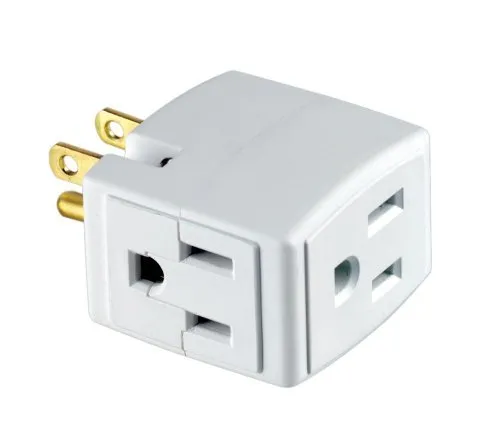
Power: Whether it’s at an airport, coffee shop, or conference, there’s one little trick that allows me to almost always have access to power outlets, even if it looks like they are all full. I simply keep this little power outlet splitter cube in my backpack. Then even if an outlet is full, I can plug in to create an extra outlet for myself, the original plug, plus an extra free slot.

313yx8V1GeL

Here it is…