Currently, web designers are advised to support browser resolutions of widths 1024px and greater based on current browser usage data. The idea is that you want your site’s design to look good, and not require a horizontal scroll bar for those users. But screen resolution and browser width are not the same thing, because of browser chrome, scroll bars, and because many users browse without their window being maximized.
Common advice is that for the 1024 resolutions you have a maximum width of around 960 or 980px to work with. But if you really need to get every last pixel in, I can confirm test results from Windows XP running at 1024×768, with Internet Explorer 6.0 fully maximized, gives you a width of 1007px to work with.
I wrote my first module for ExpressionEngine, called “Freo Add-on Installer”, with the aim of saving EE developers a lot of time. Here’s what it’s all about.
Each time you set up a website with ExpressionEngine you probably want to install several different modules, extensions, and plugins. Doing that usually involves downloading a .zip file for each add-on, then individually unzipping and uploading each file/folder to the corresponding modules/, extensions/, plugins/, language/, and themes/ folders. Then each time any add-on is updated, you have to repeat the process across all your websites.
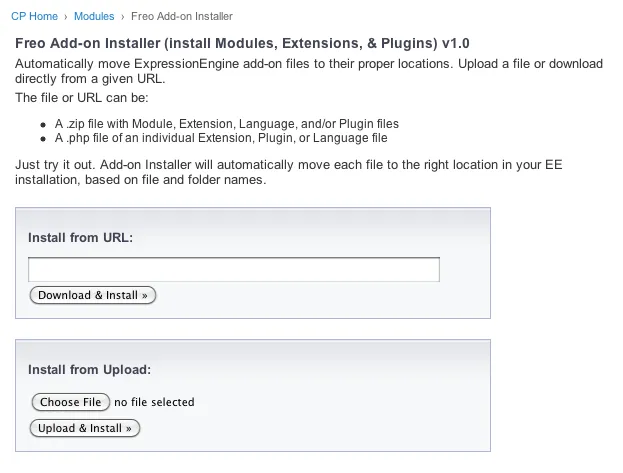
With my module,installing other add-ons is basically a one-click process. You just visit the module page (shown below) and then either upload a .zip/.php file, or give it the URL to the source from the developer’s website. Hit one button and my module takes the source file, extracts, and searches through the files and determines where each file/folder goes.
Screenshot:
For example, if you just upload a .zip file that contains a folder for a module, a pi.someplugin.php, and a lang.someplugin.php, all of the files will get extracted and moved to their proper locations. If it comes across a file it doesn’t understand, it will let you know.
Requirements:
ExpressionEngine 1.6.8
PHP cannot be in Safe Mode
You may need to change permissions for a few folders if instructed
These likely would only be a problem with some shared hosting companies. (If you need good ExpressionEngine hosting let me know).
Upload the freo_addon_installer/ folder to your system/modules/ folder
From the Modules page of your EE Control Panel, click “Install” next to “Freo Add-on Installer”
If you’re running a version of EE older than 1.6.8, copy freo_addon_installer/language/english/lang.freo_addon_installer.php to system/languages/english/
v1.1 – Fixed problem when URLs redirect, like on github download zip URLs. Added better support for installing fieldtypes for Brandon Kelly’s FieldFrame extension. (Oct. 7, 2009)
v1.0 – Initial Release. (Oct. 7, 2009)
Ideas & Plans:
Create a long list of known add-ons to choose from so that installing will truly be one-click and not require looking up a source .zip URL.
Integrate with LG Addon Updater so installing updates will be more of a breeze.
Feedback & Support:
If you encounter any problems or have any ideas for improvement at all please let me know. Leave a comment below and let me know how you like it.This support thread in the forums is the best place to resolve any problems you may have.
I was given a copy of a book called “Magento: Beginner’s Guide” to review, so here goes. Overall, the book does a good job of giving a high-level walkthrough of all the different aspects of running a store with Magento.
Chapter 1: Introduction, Chapter 2: Installation, Chapter 3: Categories and attributes – High level overview of Magento. These chapters aren’t very useful if you’ve already used Magento at all, however for someone starting from scratch this would be a faster way of learning than going through the guides on Magento’s website. Chapter 3 is available as a free sample.
Chapter 4: Taxes – Very good chapter – I actually learned a lot. It was very helpful as I am finishing up a Magento store right now and am about to configure taxes. It discusses how tax rates and rules work in detail, according to the product type and purchaser’s location.
Chapter 5: Adding simple products – Same analysis as Chapters 1-3.
Chapter 6: Minimum customization of your store’s appearance – Great for pointing beginners at where different files in Magento live and how to customize them. However many of the tips for customizing the design will break if you try to update your site and default theme. I’d recommend reading my post for Magento beginners before you start customizing anything.
Chapter 7: Beyond simple products – Helpful, although doesn’t provide much more information than is readily available on Magento.com.
Chapter 8: Customer relationships – About managing customer accounts. Configuring store contact options.
Chapter 9: Accepting payment, Chapter 10: Configuring shipping – Pretty thorough job of explaining different methods of accepting payments with the various gateways, and configuring all the different shipping options. There’s a lot of details and explanations, so I’ll be looking back on this chapter again.**
Chapter 11: Fulfilling an Order – A walk-through of fulfilling an order. Discover your options for handling order fulfillment by observing the lifecycle of an order in Magento.
Appendix: Abbreviated step-by-step directions – A good idea for any book!